Utilizing Version Control
Git Integration
myDBR includes Git integration that lets admin users commit changes to database objects (procedures, functions, views) directly from the SQL editor, and to templates from the template editor. Each save creates a versioned snapshot with the committer's name, email, subject, and optional description, giving you a full audit trail of who changed what and when.
Commit All lets you commit all uncommitted changes to Git in a single operation, useful for bulk updates or initial setup. It can be triggered manually from the admin interface or run automatically as a scheduled task via cron.
Once changes are committed locally, you can push them to a remote Git repository. Remote push can be triggered manually or as part of the same scheduled cron job, keeping your remote repository in sync with the local commits.

How it works
SQL and Template editors
When editing objects in SQL Editor or a template, admin users gain additional toolbar buttons:
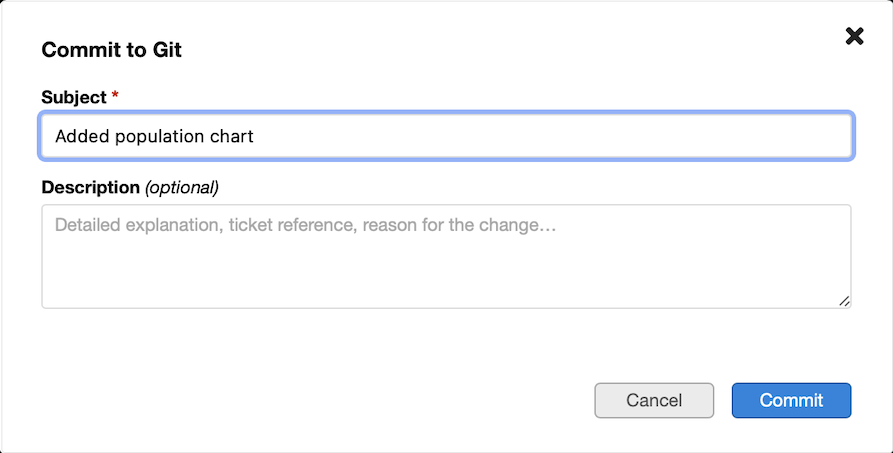
- Commit - opens a dialog to enter a subject and optional description, then saves the current editor content as a new Git commit
- Git History - opens a table of previous commits
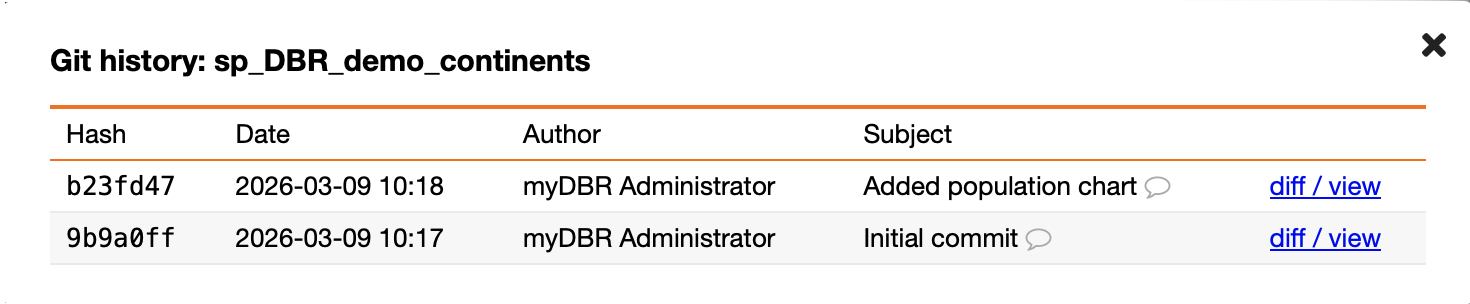
- Git History → view/divv - See changes in an intuitive side-by-side diff view

Environment Settings
The Git section of Environment Settings provides two batch operations that operate across the entire repository:
- Commit All - opens the same commit dialog and then commits every tracked object (reports, procedures, functions, views, and templates) in a single batch. A progress bar shows each object as it is processed. Objects that have not changed since their last commit are skipped automatically.
- Push (optional) - pushes all local commits to the configured remote repository. Only visible when Git Push enabled is checked in the same settings section.
- Scheduled Commit All - a lightweight HTTP endpoint (
gitcron.php) that performs the same commit-all operation in a single synchronous request, designed to be called from a cron job viawgetwithout a browser session. See Scheduled Commit All for setup instructions.
Storage Structure
Objects are stored as plain text files inside a server-side Git repository. All objects, including templates, are organised under the database name first, then by object category:
/var/mydbr/git/
  mydbr/                ← Database name
    reports/            ← myDBR report procedures (name starts with sp_DBR_)
      sp_DBR_Sales.sql
    functions/          ← Database functions
      fn_TaxCalculation.sql
    views/              ← Database views
      vw_TotalSales.sql
    procedures/         ← Other stored procedures (not reports)
      sp_UpdateInventory.sql
    templates/          ← myDBR templates
      Standard_Email.txt
      Invoice_Layout.txt
Templates note: Since templates consist of three distinct parts (Header, Row, and Footer), myDBR combines them into a single .txt file using internal separators (-- header --, -- row --, -- footer --). When you restore a historical version of a template, all three parts are updated simultaneously in the editor. A warning is shown before restoration as this will replace your current content of the tabs.
Stored Objects Categories
No Git account is required for users. Commits use the --author flag populated from the user's session (user_name / user_email), so the full history is attributable without any Git credentials on the server.
Category rules
For database objects, the report prefix is always checked first, before inspecting the SQL source.
| Priority | Category | Condition | Extension |
|---|---|---|---|
| 1 | reports | Object name starts with the myDBR report prefix (default sp_DBR_) | .sql |
| 2 | procedures | SQL source contains CREATE PROCEDURE | .sql |
| 3 | functions | SQL source contains CREATE FUNCTION | .sql |
| 4 | views | SQL source contains CREATE VIEW | .sql |
| 5 | templates | Edited via the Template Editor | .txt |
Prerequisites
1. Git must be installed
git --version
Install if missing:
## Debian / Ubuntu
sudo apt install git

## RHEL / AlmaLinux / CentOS
sudo dnf install git
Verify that the PHP process user can run the binary:
sudo -u www-data git --version
If the command fails even though which git succeeds, the PHP environment has a restricted PATH. The simplest fix is to use the full binary path in the configuration (Step 4).
2. PHP exec() must enabled
php -r "echo ini_get('disable_functions');"
exec must not appear in the output. If it does, remove it from disable_functions in php.ini and restart the web server.
Setup
Step 1 - Find your PHP process user
All subsequent steps require you to substitute the correct system user that runs the PHP process. In many environments (like Nginx with PHP-FPM), the web server user (nginx) and the PHP process user (www-data or php-fpm) are different. The Git repository must be writable by the PHP process user.
Linux
The quickest way is to ask PHP itself, since it is already running under the right user:
## Create a temporary PHP file in the webroot
echo '<?php echo shell_exec("whoami"); ?>' > /var/www/html/whoami.php
## Open it in a browser or fetch it with wget
wget -q -O - http://localhost/whoami.php
## Remove it immediately after
rm /var/www/html/whoami.php
Alternatively, check which user the PHP-FPM or web server process is running as:
## PHP-FPM (most common for Nginx)
ps aux | grep php-fpm | grep -v root | head -1 | awk '{print $1}'

## Apache
ps aux | grep -E 'apache2|httpd' | grep -v root | head -1 | awk '{print $1}'
Common values: www-data (Debian/Ubuntu), apache or httpd (RHEL/AlmaLinux/CentOS), nginx, php-fpm.
Windows (IIS)
PHP under IIS runs as the IIS application pool identity. To find it:
- Open IIS Manager → Application Pools
- Click the pool your myDBR site uses → Advanced Settings
- The value under Identity is the account (typically
IIS AppPool\DefaultAppPoolor a custom service account)
To confirm from the command line, open a PHP file in the browser:
<?php echo shell_exec('whoami'); ?>
The output will be the exact Windows account name (e.g. iis apppool\mydbr). Use this account when setting directory permissions with icacls:
icacls "C:\mydbr\git" /grant "IIS AppPool\DefaultAppPool:(OI)(CI)F" /T
macOS (development / local server)
For the built-in Apache (/usr/sbin/httpd) and most Homebrew setups the web server runs as the current user. Confirm with:
ps aux | grep httpd | grep -v root | head -1 | awk '{print $1}'
Or drop a temporary PHP file into the document root:
echo '<?php echo shell_exec("whoami"); ?>' > ~/Sites/whoami.php
wget -q -O - http://localhost/~$(whoami)/whoami.php
rm ~/Sites/whoami.php
Step 2 - Create the repository directory
Choose a location outside the webroot. The default is /var/mydbr/git.
sudo mkdir -p /var/mydbr/git
sudo chown www-data:www-data /var/mydbr/git
sudo chmod 750 /var/mydbr/git
Replace www-data with the PHP process user identified in Step 1.
No manual
git initneeded. myDBR automatically initialises the repository (runsgit init, sets a default committer identity, and creates an.htaccessguard file) the first time a commit is made. You only need the directory to exist and be writable by the PHP process user.
Attribution and User Profiles
For accurate history, ensure that myDBR users have their Name and Email defined in their user profile (or passed via SSO).
myDBR resolves the Git author in this order:
- Full Name and Email from the user's settings..
- If email is missing, it falls back to the
username@localhost.
Synchronising with Remote Repositories (optional)
The integration performs all operations on the local server repository. To sync your changes to a remote git servers like your own, GitHub, GitLab, or Bitbucket, you must configure a remote and an authentication method on the server.
1. Authentication Options
Option A: SSH (Recommended)
SSH is the most secure method for automated syncing as it uses key-based authentication.
- Generate an SSH key for your PHP process user (e.g.,
www-data):sudo -u www-data ssh-keygen -t ed25519 -C "mydbr-git-sync" - Add the public key to your remote Git service. The key is typically found at:
/var/www/.ssh/id_ed25519.pub(the path depends on the user's home directory). - Test the connection:
sudo -u www-data ssh -T git@github.com
Option B: HTTPS with Personal Access Token
Use this if SSH is restricted in your environment. Do not use your account password; use a Personal Access Token (PAT).
- Generate a PAT with
repo(write) permissions in your Git provider's settings. - Add the remote using the token in the URL:
sudo -u www-data git -C /var/mydbr/git remote add origin https://<username>:<token>@github.com/your-org/your-repo.git
2. Configuration
Once authentication is ready, link your local repository to the remote:
## Add the remote server
sudo -u www-data git -C /var/mydbr/git remote add origin <url>

## Verify the connection
sudo -u www-data git -C /var/mydbr/git remote -v
3. Automation
Since myDBR focuses on local commits to ensure high performance and reliability, it does not push automatically. You can either use the optional Push button in Environment Settings or set up a cron job to synchronize changes.
To enable the Push button, check Git Push enabled in the Git section of Environment Settings.
Alternatively, use a cron job for full automation:
## Open crontab for the PHP process user
sudo -u www-data crontab -e

## Add a rule to push every 15 minutes
*/15 * * * * git -C /var/mydbr/git push origin main
Note: If your default branch is master instead of main, adjust the command accordingly.
Scheduled Commit All
gitcron.php is a standalone HTTP endpoint that runs the full Commit All operation in a single synchronous request. It is designed to be called from a system cron job via wget - no browser session, no CSRF token, and no interactive login required.
Configuration
Set the following fields in the Git section of Environment Settings:
| Setting | Description |
|---|---|
| Cron token | A secret token that authenticates the request. Use the Randomize button to generate one. Keep this value private. |
| Cron author name | The name that appears as the Git commit author for scheduled commits (default: myDBR Scheduler). |
| Cron author email | The email that appears as the Git commit author for scheduled commits (default: noreply@localhost). |
Save the settings after filling in the values.
Usage
## Token in the Authorization header
wget -q -O - --header="Authorization: Bearer YOUR_TOKEN" "https://example.com/gitcron.php"
Available query parameters:
| Parameter | Required | Description |
|---|---|---|
token | Yes (or use header) | Authentication token set in Environment Settings |
subject | No | Commit subject line. Defaults to Scheduled git commit |
body | No | Optional extended commit message body |
Adding a cron job
## Edit the crontab (run as any user that can reach the myDBR URL)
crontab -e

## Commit all changed objects every night at 02:00
0 2 * * * wget -q -O - --header="Authorization: Bearer YOUR_TOKEN" "https://example.com/gitcron.php" >> /var/log/mydbr-gitcron.log 2>&1
Only objects that have changed since the last successful run are committed. If nothing has changed, the endpoint reports no_changes and exits cleanly without creating an empty commit.
Response format
The endpoint always returns JSON:
{"status":"ok","hash":"a3f2b1c","staged":12,"no_changes":3,"total":15,"errors":[]}
| Field | Description |
|---|---|
status | ok - commit created; no_changes - nothing to commit; error - see error field |
hash | Short commit hash (only present when status is ok) |
staged | Number of objects that had changes and were staged |
no_changes | Number of objects that were unchanged and skipped |
total | Total number of objects inspected |
errors | Array of object names that could not be staged |
Security notes
- Keep the token secret. Anyone who knows it can trigger a commit.
- Set the
--header="Authorization: Bearer …"form to avoid the token appearing in web server access logs andcronemail output.
Git "Safe Directory"
If your Git repository is owned by a different user than the PHP process user (common in development), Git may block operations with a "dubious ownership" error.
myDBR can handle this by passing -c safe.directory=<path> to Git commands. You can enable this behavior in the configuration if your environment requires it.
Step 3 - Enable the feature in Environment settings
Enable the Git functionality and check the settings in Environment settings.
SELinux (RHEL / AlmaLinux / CentOS)
On systems with SELinux in enforcing mode the web server process is confined by default and cannot execute external binaries or write outside the webroot without explicit policy rules.
Check the current mode:
getenforce
If the output is Enforcing, apply the following:
## Allow httpd to run exec() calls
setsebool -P httpd_execmem 1

## Label the repo directory so httpd can read and write it
semanage fcontext -a -t httpd_sys_rw_content_t "/var/mydbr/git(/.*)?"
restorecon -Rv /var/mydbr/git
AppArmor (Debian / Ubuntu)
If AppArmor is active and your Apache profile restricts write access outside the webroot, add the repository path to the profile:
## /etc/apparmor.d/usr.sbin.apache2  (or local override)
/var/mydbr/git/** rwk,
/usr/bin/git      ix,
Reload the profile after editing:
sudo apparmor_parser -r /etc/apparmor.d/usr.sbin.apache2
Smoke test
After completing setup, run a quick end-to-end check as the PHP process user before handing the feature over to users:
sudo -u www-data bash -c '
  mkdir -p /var/mydbr/git/test/procedures
  echo "-- smoke test" > /var/mydbr/git/test/procedures/smoke_test.sql
  git -C /var/mydbr/git add test/procedures/smoke_test.sql
  git -C /var/mydbr/git commit --author="Admin <admin@localhost>" -m "Smoke test"
  git -C /var/mydbr/git log --oneline -1
  rm -rf /var/mydbr/git/test
  git -C /var/mydbr/git add -A
  git -C /var/mydbr/git commit -m "Remove smoke test"
'
If both commits appear without errors, the integration is ready. Run this replacing www-data with your PHP process user.
Alternatively, open the procedure editor in myDBR, load any stored procedure, click Commit, fill in a subject, and confirm. A message like Committed to Git (a3f9c12). in the toolbar confirms everything is working.
Configuration
All Git settings are managed through the Git section of Environment Settings.
| Setting | Description |
|---|---|
| Git enabled | Enables the Git Commit and Git History buttons in the SQL and Template editors, and the Commit All / Push buttons in Environment Settings |
| Git path | Full path to the git binary. Leave blank to use the system default. Use an absolute path if the binary is not in the PHP process user's PATH |
| Git repository path | Absolute path to the server-side Git repository (e.g. /var/mydbr/git). Should be outside the webroot |
| Git safe directory | Suppresses Git's "dubious ownership" error when the repository owner differs from the PHP process user |
| Git Push enabled | Shows the Push button in Environment Settings, allowing manual push to the configured remote |
| Cron token | Secret token that authenticates requests to gitcron.php. Leave blank to disable the endpoint. Use the Randomize button to generate a value |
| Cron author name | Git commit author name used for scheduled commits (default: myDBR Scheduler) |
| Cron author email | Git commit author email used for scheduled commits (default: noreply@localhost) |
Troubleshooting
| Symptom | Likely cause | Fix |
|---|---|---|
| "git init failed" on first commit | Directory does not exist or is not writable | Check ownership and permissions of repo_path |
| "git commit failed: Author identity unknown" | Repo existed before myDBR first ran, so local config was never set | Run git -C /var/mydbr/git config user.email "mydbr@localhost" and git -C /var/mydbr/git config user.name "myDBR" |
| "Git request failed" in the browser | exec() disabled in PHP | Remove exec from disable_functions in php.ini |
| Commit button appears but history is empty | First commit not yet made | Make one commit, then reload history |
| Object lands in wrong category folder | Procedure name prefix mismatch or wrong type detected | Verify the report prefix in myDBR settings matches the actual procedure name |
| Permission denied writing to repo | PHP process user does not own the directory | Re-run chown with the correct user |
| "dubious ownership" error in logs | Repo owner differs from PHP user | Set git.safe_directory to true |
| Works in CLI but not via web | SELinux or AppArmor blocking exec() | Follow the SELinux / AppArmor section above |
gitcron.php returns 403 Forbidden | Cron token not set in Environment Settings | Add a token in Settings → Git → Cron token |
gitcron.php returns 401 Unauthorized | Token in the request does not match the stored token | Verify the token value; regenerate and update the cron job if needed |
gitcron.php returns 503 | Git integration is disabled | Enable Git enabled in Environment Settings |
| Cron runs but no commit appears | No objects changed since the last run | Normal behaviour - status: no_changes means the run was successful |
errors array is non-empty in the response | One or more objects could not be fetched from the database | Check the database connection and object permissions |
mydbr_sync tool
myDBR offers a command-line tool mydbr_sync which will extract myDBR reports and other objects to the local filesystem. This will allow you to change reports on the server and extract the changes to the local filesystem, from where you can easily put the files into your version control system. If you do not have direct access to the remote database, you can use an SSH tunnel. This is an alternative to native Git-integration.
mydbr_sync is a java-program that requires minimum Java 1.6 installed.
mydbr_sync separates different objects from mydbr-database and places them on separate directories. mydbr_sync will by default produce the following file structure into the directory where it is run:
├── mydbr_sync.properties
└── mydbr
    └── default
        ├── functions
        ├── procedures
        ├── reports
        └── views
Usage
Go to the directory where you wish to extract mydbr-objects to. When you run mydbr_sync the first time it will ask you the configuration parameters and create the configuration file mydbr_sync.properties. Once the configuration file exists you just run the mydbr_sync command.
java -jar mydbr_sync.jar [filename]
- where [filename] is the name of a database configuration file (default:mydbr_sync.properties)
- mydbr_sync will check if a configuration file exists and prompt for connection parameter to create one if needed
Sample Configuration Files
The user names and password must be the ones used in myDBR
for MySQL:
user=mydbr
pass=mydbr_pass
host=localhost
port=3306
database=mydbr_demo
db_type=mysql
for Microsoft SQL Server:
user=mydbr
pass=mydbr_pass
host=localhost
port=1433
database=mydbr_demo
db_type=mssql
Additional Configuration Settings
If you have a larger reporting structure and wish to separate different sub-projects into separate directories, you can define stored routine prefixes and define sub-folders for file storage make the definition in your database configuration file with the following syntax
Each prefix is defined by prefix / subdir pairs:
prefix.your_id=your_routine_prefix
subdir.your_id=your_sub_folder_name
Additional definitions into mydbr_sync.properties:
prefix.1=sp_DBR_sales
subdir.1=sales

prefix.2=sp_DBR_development
subdir.2=development

prefix.3=fn_sales
subdir.3=sales