Query Builder
The Query Builder assists with database browsing and basic query creation. It allows you to select data across multiple tables and databases, automatically generating SQL based on existing FOREIGN KEY relationships. For new reports, the Query Builder is visible by default; for existing reports, click Show Query Builder to access it.
By automating the most repetitive parts of query construction, such as identifying tables, columns, and relationships, the Query Builder significantly accelerates the report development process.
The Query Builder interface consists of four hierarchical views:
- Databases: Lists all databases accessible to the current user.
- Tables: Displays tables within the selected database.
- Columns: Lists the columns of the selected table.
- Query Selection: Manages the columns included in the current query.
Building a Query
To build a query, select the desired columns from various tables or databases.
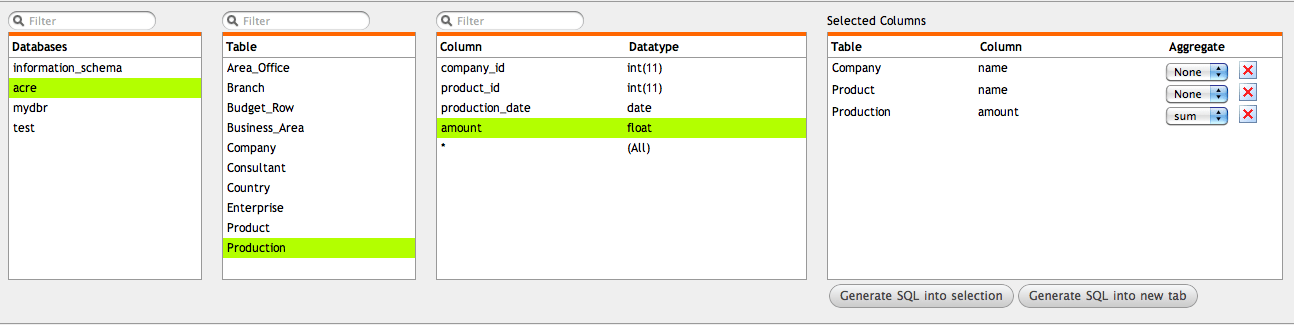
Once selected, you can reorder columns and apply aggregate functions. After finalizing your selection, generate the SQL command using one of the following buttons:
- Generate SQL into the selection: Inserts the generated SQL code at the current cursor position in the editor.
- Generate SQL into a new tab: Creates a new editor tab containing the generated code.
Example Generated SQL:
select  c.name as 'Name',
        p.name as 'Name',
        sum(pr.amount) as 'Amount'
from acre.Company c, acre.Product p, acre.Production pr
where c.id = pr.company_id and p.id = pr.product_id
group by c.name, p.name;
Note: If foreign key constraints are not defined in your database, the Query Builder cannot automate joins (resulting in a default
WHERE 1=1clause). To resolve this, you can either define foreign keys in the database or, if that is not possible, specify the relationships within myDBR using themydbr_key_column_usagetable.