Barcode Extension
The Barcode-extension utilizes Johan Lindell's JsBarcode JavaScript library. The supported barcode types are
- CODE128 (auto and force mode)
- CODE39
- EAN-8
- EAN-5
- EAN-2
- UPC (A)
- ITF-14
- ITF
- MSI10
- MSI11
- MSI1010
- MSI1110
- Pharmacode
Commands
dbr.barcode - Displays a barcode
Syntax
select 'dbr.barcode', type | options [, tag];
Syntax Tips
-
type
Any of the supported barcode types (e.g., 'CODE128', 'EAN13'). -
options
A JSON object containing configuration options supported by JsBarcode. -
tag
The HTML tag used to render the barcode (svg,canvas, orimg). Defaults toimg.
Usage
The dbr.barcode command accepts either a barcode type string or a JSON object containing configuration options supported by JSBarcode. For a complete list of available settings, refer to the JsBarcode website.
select 'dbr.keepwithnext';
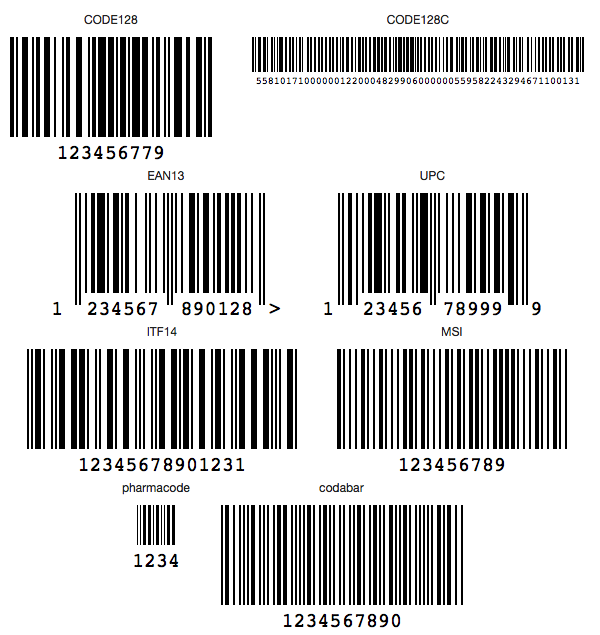
select 'dbr.subtitle', 'CODE128';
select 'dbr.barcode', 'CODE128';

select '123456779';

select 'dbr.subtitle', 'CODE128C';
select 'dbr.barcode', '{format: "CODE128C", width:1, height:35, fontSize:10}';
select '558101710000001220004829906000000559582243294671100131';

select 'dbr.keepwithnext', 'reset';

select 'dbr.keepwithnext';
select 'dbr.subtitle', 'EAN13';
select 'dbr.barcode', '{format: "EAN13", lastChar: ">"}';
select '1234567890128';

select 'dbr.subtitle', 'UPC';
select 'dbr.barcode', 'UPC';
select '123456789999';

select 'dbr.keepwithnext', 'reset';

select 'dbr.keepwithnext';
select 'dbr.subtitle', 'ITF14';
select 'dbr.barcode', 'ITF14';
select '12345678901231';

select 'dbr.subtitle', 'MSI';
select 'dbr.barcode', 'MSI';
select '123456789';

select 'dbr.keepwithnext', 'reset';

select 'dbr.keepwithnext';
select 'dbr.subtitle', 'pharmacode';
select 'dbr.barcode', '{format: "pharmacode", width:1, height:40, displayValue: true}', 'svg';

select '1234';

select 'dbr.subtitle', 'codabar';
select 'dbr.barcode', 'codabar';
select '1234567890';