Organization Chart Extension
The Organization Chart extension enables the creation of optimized organization charts using HTML5 Canvas. Nodes can be positioned to the left, right, or below their parent node, allowing for compact chart layouts.
In most cases, databases store information about the organizational hierarchy (parent-child relationships) but not the positioning of each node (left, right, or below). To address this, a linked report can be attached to each node so that positioning can be selected when the chart is displayed. See the example below.
The extension automatically calculates the size of the chart and its nodes. Various parameters can be configured through the options.
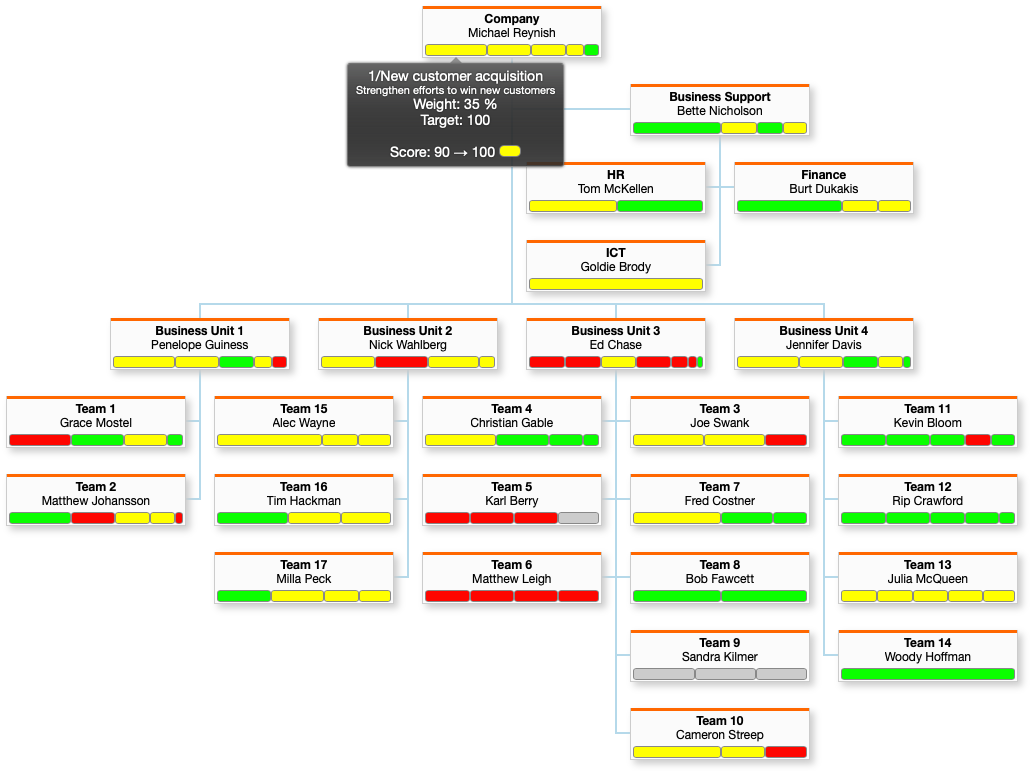
Organization nodes can optionally include targets (KPI metrics), making the organization chart suitable for visualizing target setting across the organization. See the example below.
Commands
dbr.org.chart - Displays an organization chart
dbr.org.chart.nodeclass - Adds a CSS class to an organization node
dbr.org.chart.nodesize - Sets global node dimensions
dbr.org.chart.nodewidth - Sets the width for an individual node
dbr.org.chart.nodehspace - Sets the horizontal spacing between nodes. Default is 30px
dbr.org.chart.nodevspace - Sets the vertical spacing between nodes. Default is 30px
dbr.org.chart.nodehshift - Sets the horizontal shift for sibling nodes in pixels. Default is 15px
dbr.org.chart.nodeheight - Sets the height for an individual node
dbr.org.chart.autobalance - Defines automatic positioning for 'a'-nodes
dbr.org.chart.animate - Enables or disables chart animation
dbr.org.chart.lineclass - Sets the CSS class for the connector line ending at the node
dbr.org.chart.toggle - Configures the ability to toggle sub-charts, with an optional database callback
dbr.org.chart.nodetoggle - Sets the initial toggle state for a node (1=toggled, 0=open)
dbr.org.chart.bracket - Use bracket style chart (horizontal, growing right)
dbr.org.chart.bracket.space - Minimum space between childs from different parents
dbr.org.chart.bracket.radius - Define radius for bracket style chart line corners
dbr.org.chart.tooltip - Adds a tooltip to a node
dbr.org.chart.move - Enables reorganization by moving subtrees
dbr.org.chart.drop - Enables dropping nodes onto each other
dbr.org.target - Adds a target indicator to a node
dbr.org.chart.bracket - Use bracket style chart (horizontal, growing right)
Syntax
select 'dbr.org.chart' {,options}
select 'dbr.org.chart.nodeclass', ColumnReference
select 'dbr.org.chart.nodesize', width, height
select 'dbr.org.chart.nodewidth', ColumnReference
select 'dbr.org.chart.nodehspace', space
select 'dbr.org.chart.nodevspace', space
select 'dbr.org.chart.nodehshift', space
select 'dbr.org.chart.nodeheight', ColumnReference
select 'dbr.org.chart.autobalance', '[r[,[l,level2u]]]'
select 'dbr.org.chart.animate', 0
select 'dbr.org.chart.lineclass', ColumnReferenceLineClass
select 'dbr.org.chart.toggle', 0 | 1 | procedure_name
select 'dbr.org.chart.nodetoggle', ColumnReferenceToggle
select 'dbr.org.chart.tooltip', ColumnReference
select 'dbr.org.chart.move', move_report[, can_move_report, [callback]]
select 'dbr.org.chart.drop', drop_report[, can_drop_report, [callback]]
select 'dbr.org.target', node_id, weight, 0, color, text
Syntax Tips
The options parameter is a JSON string that can include:
-
boxWidth
Node width. If not defined, it will be automatically calculated. -
boxHeight
Node height. If not defined, it will be automatically calculated. -
hSpace
Horizontal spacing between nodes. Default is 30px. -
vSpace
Vertical spacing between nodes. Default is 30px. -
hShift
The global horizontal shift for sibling nodes, in pixels. Default is 15px. -
autobalance
Determines how nodes are balanced automatically. Default is 'auto'. Options include 'l', 'r', and level2u=0 (where level 2 nodes are not u-positioned).
Target parameters are: node_id, weight, 0, color, text
-
node_id
The ID of the node to which the target is attached. -
weight
The relative width of the target in the node (weight / sum of all weights in the node). -
target
Reserved field; use 0. -
color
The color used to display the target in the chart. -
text
The tooltip displayed when the user hovers over the target. -
ColumnReferenceToggle
A reference to a column that specifies whether a sub-chart is toggled (0) or fully displayed (1). -
ColumnReferenceLineClass
A reference to a column containing the CSS class for the node connector line. Predefined classes include 'dotted' and 'double'.
Usage
select 'dbr.org.chart';
select 'dbr.org.chart.nodesize', 120, 30;

select id, parent_id, position, name
from mydb.organizationdata;
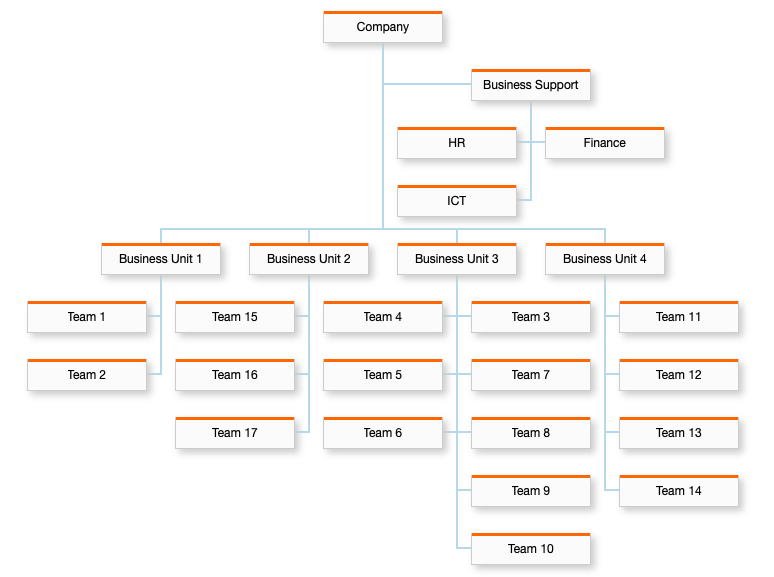
The top-level node should have a parent_id of NULL. The position value is a string: 'r' (right), 'l' (left), 'u' (under), or 'a' (auto).
Defining Node Positions
A node can be positioned to the left, right, or underneath its parent. You can specify a fixed position ('l', 'r', or 'u') or let myDBR automatically balance the chart using the 'a' (auto) position.
When automatic balancing is used, myDBR places nodes without siblings to the left and right (divided equally) and places nodes with siblings underneath. This behavior can be refined with the autobalance option: 'l' forces nodes without siblings to the left, while 'r' forces them to the right.
Automatic balancing often results in a wider, shorter chart. For example, a "Business Support" node without siblings might be placed to the left, while other nodes with siblings are placed underneath. This is ideal for organizations where nodes have relatively few siblings.
Dynamic Node Positioning
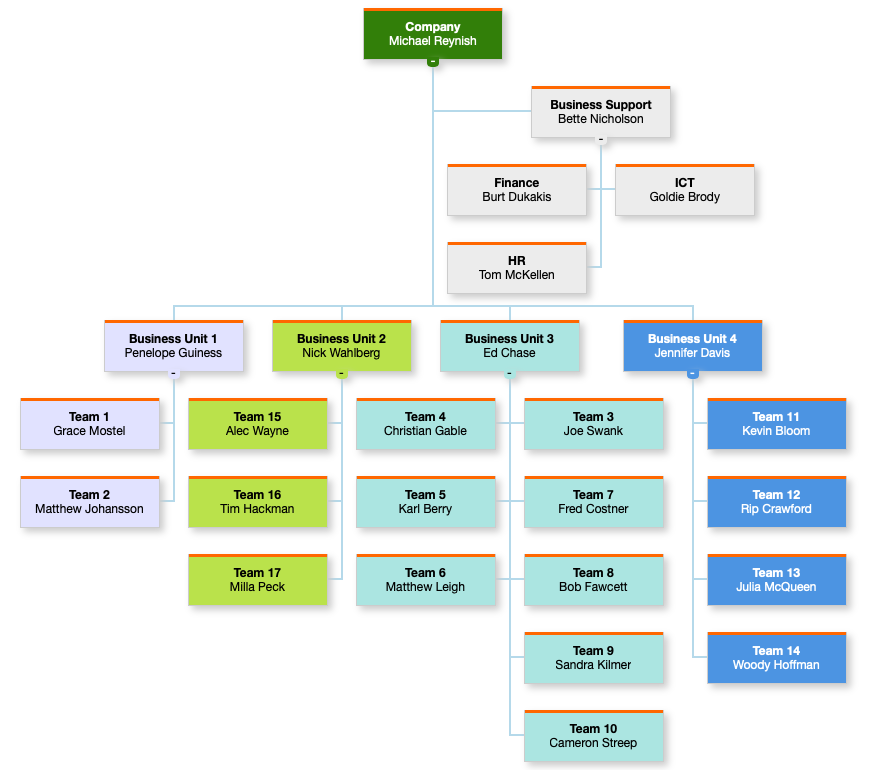
To create customized organization charts, you can adjust positions dynamically using linked reports. For example, you can store node positions in a table (e.g., organization_node_positions) and use a linked report to update individual nodes.
select 'dbr.css', '
.organization_chart .n.ceo {background: #327F09; color: white;}
.organization_chart .n.support {background: #ececec;}
.organization_chart .n.bu1 {background: #e1e2ff;}
.organization_chart .n.bu2 {background: #BAE24B;}
.organization_chart .n.bu3 {background: #ABE5E1;}
.organization_chart .n.bu4 {background: #4B94E2;color: white;}
';

select 'dbr.resultclass', 'myorg';
select 'dbr.org.chart';
select 'dbr.org.chart.nodesize', 140,50;
select 'dbr.org.chart.nodeclass', 'nodeclass';

select 'dbr.report', 'sp_DBR_set_node_position', 'action_div[]', 'in_id=id', 'in_pos="l"', '"Position left"';
select 'dbr.report', 'sp_DBR_set_node_position', 'action_div[]', 'in_id=id', 'in_pos="r"', '"Position right"';
select 'dbr.report', 'sp_DBR_set_node_position', 'action_div[]', 'in_id=id', 'in_pos="u"', '"Position under"';

select o.id, o.parent_id, ifnull(p.position, 'u'), o.name, bu as 'nodeclass'
from mydb.organizationdata
    left join organization_node_positions p on p.id=n.id;
In this setup, action_div[] is a dynamically created embed_object that captures the output of sp_DBR_set_node_position. The linked report updates the node position in the database and uses the chart's changeNodePosition method to update the UI:
create procedure sp_DBR_set_node_position(
in_id int,
in_pos char(1)
)
begin

delete from organization_node_positions where id=in_id;

insert into organization_node_positions (id, pos)
values (in_id, in_pos);

select 'dbr.javascript', concat("orgchart_from_class('myorg').changeNodePosition(", in_id, ", '", in_pos, "', 1);");

end
The orgchart_from_class('myorg') function retrieves the JavaScript chart object. Its changeNodePosition function updates the internal data structure and redraws the chart. To simply redraw the chart without changing positions, use the recalculate_positions method.
Rearranging the Chart by Moving Nodes
You can rearrange the chart by dragging subtrees (move) or individual nodes (drop) to new positions. To enable this, define a move/drop procedure. The procedure receives two parameters: the new parent ID and the ID of the moved node. You can also specify a validation report to determine if a move is permitted and a callback JavaScript function to handle UI updates after the operation.
In a simple move operation, the move_report updates the node's parent ID. If no callback is defined, myDBR automatically redraws the chart. By default, the subtree or node retains its original positioning style ('u', 'l', or 'r'). However, you can specify a new position by returning a value ('u', 'l', 'r', or 'a') from the move procedure.
select 'dbr.org.chart.move', 'sp_DBR_organization_move_node';

create procedure sp_DBR_organization_move_node (
in_parent_id int,
in_node_id int
)
begin

update organization
set parent_id = in_parent_id
where id=in_node_id;

-- Optional: return 'r' to position the subtree to the right.

end
Validating Moves and Drops
When can_move_report or can_drop_report is defined, myDBR verifies if the move is allowed before performing the operation.
select 'dbr.org.chart.move', 'sp_DBR_organization_move_node', 'sp_DBR_organization_can_move_node';
The validation report receives the parent_id and node_id parameters and should return 1 if the move is allowed or 0 if it is prohibited.
create procedure sp_DBR_organization_can_move_node (
in_parent_id int,
in_node_id int
)
begin

if (/* condition determining if a move/drop can be made */) then
  select 1;
else
  select 0;
end if;

end
Extending the Redraw Behavior
By default, myDBR automatically updates the UI after a move or drop. For a subtree move, it relocates the entire branch. For a node drop, it moves the individual node and reassigns its former children to its previous parent.
You can extend or override this behavior using a callback function specified in dbr.org.chart.move or dbr.org.chart.drop.
select 'dbr.javascript', 'function moveNode(c, src, dst, con) {
c.moveSubtree(src, dst, con);
}';

select 'dbr.org.chart.move', 'sp_DBR_organization_move_node', 'sp_DBR_organization_can_move_node', 'moveSubtree';
The default callback for a move is:
function moveSubtree(c, src, dst, con) {
c.moveSubtree(src, dst, con);
}
The default callback for a drop is:
function dropNode(c, src, dst, con) {
c.moveNode(src, dst, con);
}
The c parameter provides access to the internal API for structure management. To customize the behavior, define your own function; if you skip the c.moveSubtree or c.moveNode calls, the default UI update will not occur, allowing you to implement custom logic.
Comprehensive Example with Positioning and Targets
This example demonstrates an organization chart with dynamic positioning, move capabilities, and target indicators.
select 'dbr.title', 'Target Browser';

select 'dbr.report', 'sp_DBR_organization_set_node_position', 'action_div[]', 'in_id=id', 'in_pos="l"', '"Position left"';
select 'dbr.report', 'sp_DBR_organization_set_node_position', 'action_div[]', 'in_id=id', 'in_pos="r"', '"Position right"';
select 'dbr.report', 'sp_DBR_organization_set_node_position', 'action_div[]', 'in_id=id', 'in_pos="u"', '"Position under"';

select 'dbr.resultclass', 'orgdemo';

select 'dbr.org.chart';
select 'dbr.org.chart.nodesize', 120, 40;
select 'dbr.org.chart.animate', 1;
select 'dbr.org.chart.move', 'sp_DBR_organization_move_node';

select 'dbr.org.target', organization_node_id, weight, 0, color, txt
from mydb.organizationdata;

select
    id,
    parent_id,
    fn_org_node_position(id, type_id),
    concat('<b>', name, '</b>', char(10), owner, char(10)) /* Final linefeed makes room for targets */
from organization
order by id;
The sp_DBR_organization_set_node_position procedure handles the database updates, while the orgchart_from_class function retrieves the chart object to update the UI:
create procedure sp_DBR_organization_set_node_position(
in_id int,
in_pos char(1)
)
begin

delete from organization_node_positions where id=in_id;

insert into organization_node_positions (id, pos)
values (in_id, in_pos);

select 'dbr.javascript', concat("orgchart_from_class('orgdemo').change_node_position(", in_id, ", '", in_pos, "', 1);");

end
The fn_org_node_position function retrieves the stored position from the database or returns a default:
CREATE FUNCTION `fn_org_node_position`(in_id int, in_type int) RETURNS char(1)
begin

declare vPos char(1);

select pos into vPos
from organization_node_positions
where id=in_id;

if (vPos is not null) then
  return vPos;
end if;

return 'u';

end
Enabling Node Drops
You can also enable dropping nodes on top of each other by passing a procedure name to dbr.org.chart.drop. While myDBR provides the drag-and-drop interface, you must define the logic for the drop operation in your database. After a drop occurs, you can refresh the entire chart or use JavaScript to modify it dynamically.
select 'dbr.org.chart';
select 'dbr.org.chart.drop', 'sp_DBR_organization_drop';

select
    id,
    parent_id,
    fn_org_node_position(id, type_id),
    name
from organization
order by id;

create procedure sp_DBR_organization_drop(
in_parent_id varchar(10),
in_node_id varchar(10)
)
begin

-- Define the logic for the drop operation here.

end
Managing Node Toggle States
Toggling functionality is enabled by default. You can persist the toggled state in your database by specifying a toggle report in dbr.org.chart.toggle. This report receives two parameters: the node ID and the toggle state (1 for toggled, 0 for open). To disable toggling entirely, pass 0 to dbr.org.chart.toggle.
select 'dbr.org.chart';
-- Specify the column containing the initial toggle state for each node:
select 'dbr.org.chart.nodetoggle', 'toggled';
-- Save the updated toggle status to the database:
select 'dbr.org.chart.toggle', 'sp_DBR_organization_toggle';

select
    id,
    parent_id,
    fn_org_node_position(id, type_id),
    name,
    toggled
from organization
order by id;

create procedure sp_DBR_organization_toggle(
in_id int,
in_toggled int
)
begin

update organization
set toggled = in_toggled
where id = in_id;

end