Referencing Columns and Parameters or Passing Constants
Many myDBR commands can accept parameters that reference columns in the subsequent result set or refer to the report's own input parameters. You can reference these by position (number) or by name. Using name-based references is recommended, as it improves code readability and simplifies maintenance.
Column Reference
The dbr.sum command, for example, generates a summary row for specified columns. It accepts one or more column references as parameters, which correspond to columns in the following result set. myDBR supports three methods for referencing columns:
- Referencing by tag (Recommended)
- Referencing by column name
- Referencing by column position
Referencing Columns by Tag
Column tags are defined by enclosing a reference name in brackets at the end of a column alias. myDBR automatically removes these tags from the visible column headers in the final report. This is the most robust method for referencing columns. Brackets are required for dbr.summary.calc and dbr.calc expressions, as well as for the column parameter in dbr.report.
select 'dbr.sum', 'length' ,'weigth';
select 'dbr.report', 'sp_DBR_show_product_detail', '[product]', 'popup', 'inProduct_id=product_id';
select 'dbr.calc', 'volume', '[length]*[weigth]*[height]';

select product_id,
       product as 'Product[product]',
       length as 'Length[length]',
       weight as 'Weight[weigth]',
       height as 'Height[height]',
       null as 'volume'
from mydb.products;
Referencing Columns by Name
This method uses the literal column names. While straightforward, it may require updates if you implement multilingual reports or if your result set contains multiple columns with identical names.
select 'dbr.sum', 'Length' ,'Weight';

select product as 'Product',
       length as 'Length',
       weight as 'Weight'
from mydb.products;
Referencing Columns by Position
This method uses the ordinal position of the column in the result set (starting from 1). While useful for simple, stable queries, it can lead to maintenance issues if the query structure changes and columns are reordered.
select 'dbr.sum', 2, 3;

select product as 'Product',
       length as 'Length',
       weight as 'Weight'
from mydb.products;
Parameter Reference
Several commands, such as dbr.report, dbr.url, and dbr.editable, allow you to pass the current report's input parameters as values. These can be referenced in two ways:
- Referencing by name (Recommended)
- Referencing by position
Referencing Parameters by Name
To reference a parameter by name, enclose the parameter name in parentheses.
create procedure sp_DBR_myreport(
inCategory int
)
begin
select 'dbr.url', 'http://myserver.com/myservice', '', 1, 'c=(inCategory)', 'p=product_id';

select name, product_id
from mydb.products
where category=inCategory;
In this example, if the report is executed with inCategory=2 and the user selects a product with product_id=200, the resulting URL will be: http://myserver.com/myservice?c=2&p=200.
Referencing Parameters by Position
Parameters can also be referenced by their ordinal position using a negative number (e.g., -1 refers to the first parameter of the original report). This method is primarily maintained for backward compatibility.
create procedure sp_DBR_myreport(
inCategory int
)
begin
select 'dbr.url', 'http://myserver.com/myservice', '', 1, 'c=-1', 'p=product_id';

select name, product_id
from mydb.products
where category=inCategory;
If inCategory=2 and product_id=200, the resulting URL will be: http://myserver.com/myservice?c=2&p=200.
Passing Constants
You can pass constant values to linked reports or URLs by enclosing them in double quotation marks. Ensure the values are in a format compatible with your database (e.g., using a period for decimals and YYYY-MM-DD for dates).
In the following example, the inExtra parameter is assigned the constant value "extra".
create procedure sp_DBR_myreport(
inCategory int
)
begin
select 'dbr.report', 'sp_DBR_show_product_detail', '[product]', 'popup', 'inProduct_id=product_id', 'inExtra="extra"';

select product_id,
       product as 'Product[product]',
       length as 'Length[length]',
       weight as 'Weight[weigth]',
       height as 'Height[height]',
       null as 'volume'
from mydb.products;
Referencing Crosstab Total Columns
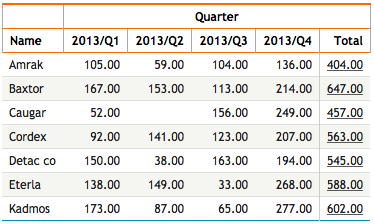
Crosstab total columns are dynamically generated to hold horizontal calculations (e.g., sum, min, max). You can reference these columns by appending .h to the column tag. This allows you to place report links within summary columns or use summary values as parameters.
create procedure sp_DBR_myreport()
begin
select 'dbr.report', 'sp_DBR_show_items', '[Items.h]', 'in_items_total=Items.h';

select 'dbr.crosstab', 'Quarter';
select 'dbr.hsum', 'Items';

select Name, Quarter, Items as '[Items]'
from mydata;
In this example, the dbr.report link is placed in the horizontal total column for Items, and the in_items_total parameter receives the calculated summary value.