Editable reports
Commands
dbr.editable - Enables in-place editing for a specific column
dbr.upload - Facilitates file uploads to the server's filesystem
dbr.upload.options - Configures specific file upload settings
dbr.selectable - Converts an ID column into checkboxes for batch processing with linked reports
dbr.selectable.selected - Preselects specific rows in a dbr.selectable result set
Syntax
select 'dbr.editable', ColumnReference, procedure_name, [,parameter_name=paramref] [,type=input_type] [,select=query [[ColumnReference]] ] [,options={'jeditable_options'}]
select 'dbr.upload', path_to_directory, upload_sp [, parameters]
select 'dbr.upload.options', option, value
select 'dbr.selectable', ColumnReference
select 'dbr.selectable.selected', id
Syntax Tips
-
ColumnReference
The column to be configured for editing. -
procedure_name
The stored procedure that handles the update. User permissions for this procedure determine if the column remains editable for them. -
parameter_name
The parameter name in the update procedure (or URL) to which the value is passed. -
ColumnReference/ParameterReference
A value from the result set or a report parameter to be passed to the update procedure. -
type
Specifies the input method for editing if something else than plain input. Supported types include:inout(the default)textareaautosize(automatically resizing textarea)select(standard dropdown list)select_find(searchable dropdown list)autocomplete(AJAX-based search)radiobuttoncheckboxdate/datepickerdatetime/datetimepickertime/timepickercolor/colorpickerrichtext(requires the Rich Text extension)file_rename- Code editing:
html,php,javascript,css, andsql(requires the Code Editor extension) If omitted, a standard text input field is used.
-
select
Specifies the query forselect,select_find, orradiobuttontypes. The query must return an ID and a display value. It can be a direct SQL statement or a stored procedure call. Forselectandselect_find, a third column can be included to defineoptgroups. You can use[ColumnReference]notation to pass row-specific data to the query. -
checkbox_id
For thecheckboxtype, this defines theColumnReferencefor the unique item IDs. -
options
Passes configuration parameters to the underlying Jeditable component. -
path_to_directory
The absolute server path where uploaded files will be stored. -
upload_sp
The stored procedure executed after a successful file upload. -
upload option
Used withdbr.upload.optionsto configure behavior:title: The title displayed in the upload interface.noreplace: Prevents overwriting existing files (set to1).add_time: Appends a timestamp to filenames to ensure uniqueness.accepted_files: A comma-separated list of allowed file extensions.maxfiles: The maximum number of files allowed per upload.maxfilesize: The maximum file size in megabytes.maxheight/maxwidth: Maximum image dimensions in pixels.quality: The JPEG/WebP compression quality (0 to 1, default is 0.8).filename: Renames the file during the upload process.
Description
A report column can be designated as editable (in-place editing) using the dbr.editable command. This command specifies the target column and the parameters required for the update operation. When a user interacts with an editable cell, an in-place editor is displayed. The modified value, along with any additional parameters, is transmitted to the specified stored procedure.
The procedure may either commit the update or reject it (e.g., if validation fails) by returning the original value. If the procedure returns a new value, myDBR updates the cell and applies any relevant formatting.
Conditional Editing and Restrictions
In some scenarios, you may need to restrict editing to specific rows or cells. To prevent editing based on data conditions, use the show_link parameter within the dbr.editable command. Alternatively, you can apply the no_edit CSS class to specific cells using dbr.cellclass.
For information on editing multiple columns simultaneously through a form, refer to Creating Editable Reports.
Advanced Configuration and Callbacks
The dbr.editable command supports several options for customizing the user experience:
- Custom Input Types: Change the editor from a basic text field to a more specialized interface:
select 'dbr.editable', 'col', 'sp_DBR_budget_edit_comment', 'inID=id', 'inQuarter=Q', 'type=textarea', "options={'rows':6,'cols':20}";
- Editor Dimensions: Define the physical size of the in-place editor:
select 'dbr.editable', 'col', 'sp_DBR_budget_edit', 'inId=id', 'inQuarter=Q', "options={'height':20}";
- JavaScript Callbacks: Execute custom logic after an update is completed:
select 'dbr.editable', 'col', 'sp_DBR_budget_edit', 'inId=id', 'inQuarter=Q', "options={'height':20, 'callback':autosum_int}";
Callback Functions
A callback function, typically defined via dbr.javascript, receives two arguments:
- Value: The data returned by the update procedure (often a JSON string if multiple columns are affected).
- Settings (Optional): The underlying Jeditable configuration object.
Available helper functions for Post-Editing tasks:
col_value_get(obj, column[, decimals])
Retrieves the value of a cell.columncan be an index or a CSS class.col_value_set(obj, column, decimals, value[, prefix, suffix])
Updates the value and formatting of a cell.ct_total(obj, null, decimals, value[, prefix, suffix])
Recalculates horizontal aggregates within a crosstab starting from the specified cell.col_value_text(obj, column, value)
Manages the textual content of a cell.col_sum(obj, column[, decimals, prefix, suffix])
Calculates the total for a specific column.autosum_int(obj[, colindex, prefix, suffix])
Automatically updates the integer sum of a column. Ifcolindexis omitted, it targets the currently edited column.autosum_float(obj[, colindex, decimals, prefix, suffix])
Automatically updates the decimal sum of a column.
In these functions, obj refers to the DOM element of the edited cell (accessible as this within the callback).
Examples
Basic Implementation
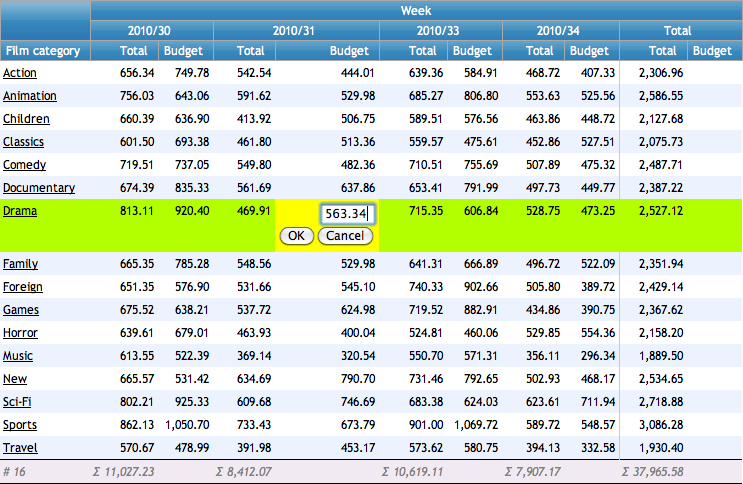
The following example demonstrates in-place editing within a crosstab report. The Budget column is configured for editing via the sp_DBR_update_crosstable procedure.
Parameters used in this example:
Budget: The target column for editing.sp_DBR_update_crosstable: The stored procedure that processes the update.inCategory=cat: Maps thecatcolumn value (Category) to theinCategoryparameter.inWeek=Week: Maps theWeekcolumn value (payment_week) to theinWeekparameter.
create procedure sp_DBR_InPlaceEditing
begin
select 'dbr.editable', 'Budget', 'sp_DBR_update_crosstable', 'inCategory=cat', 'inWeek=week';

select 'dbr.crosstab', 'Week';
select 'dbr.count', 'cat';
select 'dbr.sum', 'Total';
select 'dbr.hsum', 'Total';
select 'dbr.hidecolumns', 1;

select  category as 'Film category[cat]',
  payment_week 'Week',
  amount as 'Total',
  budget as 'Budget',
  category_id
from film_budget;

end
The update procedure (sp_DBR_update_crosstable) receives the specified mapping parameters, plus the new value as the final argument (inValue).
create procedure sp_DBR_update_crosstable(
inCategory int,
inWeek int,
inValue float
)
begin

if (inValue > 0) then
  /* Accept the update and commit to the database */
  update film_budget
  set budget = inValue
  where category_id=inCategory and payment_week=inWeek;
else
  /* Reject the update and return the current value to reset the cell */
  select budget
  from film_budget
  where category_id=inCategory and payment_week=inWeek;
end if;

end
Complex Updates with Multiple Return Values
If the update procedure returns multiple columns, myDBR provides these values to the callback function as a JSON string.
create procedure sp_DBR_edit_with_callback_JSON()
BEGIN

select 'dbr.javascript', '
function country_callback(val)
{
  /* Parse the JSON string returned by the procedure */
  var c = JSON.parse(val);

  /* Update adjacent cells using the returned data */
  this.textContent = c.Name;
  this.nextSibling.textContent = c.Code;
  this.nextSibling.nextSibling.textContent = c.Continent;
}
';

select 'dbr.editable', 'Country', 'sp_DBR_country_edit', 'inPerson=Person', 'type=select_find', 'select=select Code, Name from demo_country', "options={'callback':country_callback}";

select p.id as 'PersonID', p.Person, c.Name as 'Country', c.Code as 'Country Code', c.Continent
from Persons p
 join Countries on c.Code=p.CountryCode;

end
The update procedure for the above example:
create procedure sp_DBR_country_edit(
inPerson int,
inCode varchar(3)
)
begin

update Persons
set CountryCode=inCode
where id=inPerson;

/* Return multiple columns to trigger a JSON response in the callback */
select inCode as Code, Name, Continent
from Countries
where Code=inCode;

end
Supported Input Types
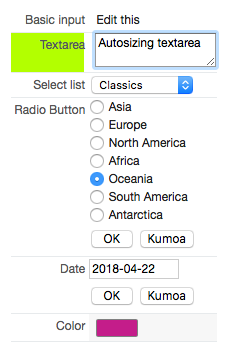
myDBR supports various input methods, including standard text fields, textareas, dropdown lists, radio buttons, and date/color pickers.
create procedure sp_DBR_update_inputtype()
begin
select 'dbr.pageview';

select 'dbr.javascript', '
function color_callback(settings, cell)
{
  /* Convert the hex value (e.g., #626262) into a visual color representation */
  colorpicker.convert(this);
}';

select 'dbr.editable', 'Basic', 'sp_DBR_input_edit', 'inId=id';
select 'dbr.editable', 'autosize', 'sp_DBR_text_edit', 'inId=id', 'type=autosize';
select 'dbr.editable', 'select', 'sp_DBR_varchar_edit', 'inId=id', 'type=select', "select=select id, value from char_values";
select 'dbr.editable', 'radio', 'sp_DBR_integer_edit', 'inId=id', 'type=radiobutton', "select=sp_radiovalues";
select 'dbr.editable', 'Date', 'sp_DBR_date_edit', 'inId=id', 'type=datepicker';
select 'dbr.editable', 'color', 'sp_DBR_color_edit', 'inId=id', 'type=colorpicker', "options={'callback':color_callback}";

select 'dbr.hidecolumn', 'id';

select  e.plain_column as 'Basic Input[Basic]',
        e.text_column as 'Textarea[autosize]',
        c.value as 'Select list[select]',
        i.value as 'Radio Button[radio]',
        e.date_column as 'Date',
        e.color as 'Color[color]',
        id
from mydb.editable e
  join int_values i on i.id = e.integer_column
  join char_values c on c.id = e.char_column;

end
Autocomplete Functionality
The autocomplete type allows users to search large datasets via AJAX. The user interacts with display values (e.g., a country name), while the underlying ID (e.g., a country code) is passed to the database. Setting allow_new: true in the options allows users to enter custom values not present in the database.
select 'dbr.hidecolumn', 'ID';

select 'dbr.editable', '[autoc]', 'sp_DBR_edit_country_ac', 'in_id=ID', 'type=autocomplete', 'select=sp_country_ac';

select e.id as 'ID', c.country as 'Country[autoc]'
from mydata e
 left join countries c on c.code=e.country_code;

The search procedure for the autocomplete field should return three columns: the display value, an optional description, and the unique ID.
create procedure sp_country_ac(
in_search varchar(255)
)
begin

select country, concat('Capital: ', capital), code
from countries
where country like concat('%', in_search, '%')
limit 20;

end
The int_values table and its associated sp_radiovalues procedure look like this:
select * from int_values;

id   name
-----------
 1   'Asia'
 2   'Europe'
 3   'North America'
 4   'Africa'
 5   'Oceania'
 6   'South America'
 7   'Antartica'

create procedure sp_radiovalues()
begin

select id, name
from int_values;

end
Updating procedures receive two parameters: the supplied 'id' parameter from the first column of the result set, and the user-supplied value with the specific data type. The update procedures can include checks for the input, update the data, and optionally return a value that will replace the user input.
For the date column, a direct update is performed:
create procedure sp_DBR_date_edit (
inId int,
inUservalue date
)
begin

update mydb.editable
set date_column = inUservalue
where id=inId;

end
For the datetime, we can, for example, check if the date belongs to the current year and accept or reject the update based on that.
create procedure sp_DBR_datetime_edit (
inId int,
inUservalue datetime
)
begin

/* Does the user date belong to current year? */
if ( year(inUservalue) = year(now()) ) then
  update mydb.editable
  set datetime_column = inUservalue
  where id=inId;
else
  /* Do not update and return the original data back to report */
  select datetime_column
  from mydb.editable
  where id=inId;
end if;

end
myDBR uses the IDs of the user-selectable radio buttons. If an update is rejected after the ID was already converted, myDBR automatically converts it back to the user-visible value.
create procedure sp_DBR_integer_edit (
inId int,
inUservalue int
)
begin

update mydb.editable
set integer_column = inUservalue
where id=inId;

end
Select works just like radio buttons, automating the conversion between IDs and user-visible values.
create procedure sp_DBR_varchar_edit (
inId int,
inUservalue varchar(5)
)
begin

update mydb.editable
set varchar_column = inUservalue
where id=inId;

end
Checkbox Editing
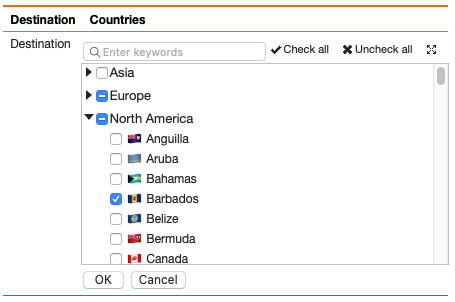
When using the checkbox type, IDs and display values are provided in separate columns. The ID column is specified using the checkbox_id option. Selected values are returned wrapped in a DIV with the class editable_cb_item and separated by a DIV with the class editable_cb_item_comma. This structure allows for flexible formatting via CSS (e.g., comma-separated on one line or as a vertical list).
Checkbox editing supports several behavioral options:
find: Enables a search field for filtering choices.scroll: Displays the choices in a scrollable list.collapse: Allows the selection list to be collapsed (useful for long lists).html: Preserves HTML within the cell.
create procedure sp_DBR_editable_checkbox()
begin

-- Increase the max length for group_concat in MySQL to accommodate many selections
SET @@group_concat_max_len = 100000;

select 'dbr.editable', '[Categories]', 'sp_DBR_edit_film_category', 'in_film_id=film_id','checkbox_id=ids', 'type=checkbox', 'select=select category_id, name from category';

select fi.film_id, fi.title, ca.cat_ids as 'ids', ca.cat_names as 'Categories'
from film_samples fi
join (
  select f.film_id, group_concat(c.category_id) as cat_ids, group_concat(c.name) as cat_names
  from film_samples f
    left join film_category fc on fc.film_id=f.film_id
    left join category c on c.category_id=fc.category_id
  group by f.film_id
) ca on ca.film_id = fi.film_id;

select 'dbr.editable', '[Countries]', 'sp_DBR_edit_selected_demo_countries', 'in_id=id','checkbox_id=codes', 'type=checkbox',
  'select=select c.Code, concat(c.flag, " ", c.Name), c.Continent from country c order by c.Continent, c.Name', "options={'html':1, 'scroll':1, 'find':1}";

select
  d.id,
  group_concat(s.country_code) as 'codes',
  concat('dbr.html:', group_concat(concat('<div class="editable_cb_item">', c.flag, ' ', c.name, '</div>') SEPARATOR '<div class="editable_cb_item_comma">,</div>')) as Countries
from data d
  left join selected_demo_countries s on s.id=d.id
  left join country c on c.Code=s.country_code
group by d.id;

end
Passing Row Data to Parameter Queries
When using a stored procedure for a dbr.editable selection list, you can pass data from the current row to the procedure using standard column references.
create procedure sp_DBR_update_inputtype_parameter()
begin

select 'dbr.pageview';

select 'dbr.editable', 'Select', 'sp_DBR_integer_edit', 'inId=id', 'type=select', "select=sp_select_with_params [id]";

select  id,
        date_column as 'Date',
        datetime_column as 'Datetime',
        i.value as 'Radio Button[radio]',
        c.value as 'Select'
from mydb.editable e, int_values i, char_values c
where e.integer_column = i.id and e.char_column = c.id;

end
Renaming Files with file_rename
The file_rename type is designed for managing file metadata and filesystem synchronization. This type updates both the physical file name on the server and its corresponding reference in the database.
The user is shown the current filename, while the database ID is used for processing.
create procedure sp_DBR_editable_rename()
begin

select 'dbr.editable', 'file', 'sp_DBR_editable_rename_do', 'type=file_rename', 'in_id=id';

select id, substring_index(file, '/', -1) as 'file'
from editable_rename
where id=1;

end;
The update procedure receives two automatic parameters as its final arguments:
- Action: Either
'get'(to retrieve the current full path) or'set'(to update the database after a successful rename). - Value: The new filename provided by the user.
create procedure sp_DBR_editable_rename_do(
in_id int,
in_action varchar(10),
in_file varchar(255)
)
begin

if (in_action='get') then
  select file
  from editable_rename
  where id=in_id;
else
  update editable_rename
  set file = in_file
  where id=in_id;
end if;

end
The rename operation will fail if the source file is missing, the target filename already exists, or if the web server lacks sufficient filesystem permissions.
Using Callbacks for Real-time Recalculation
You can use the autosum_int or autosum_float callback functions to automatically update summary rows after an edit is completed.
Setting the onblur option to an empty string displays explicit OK and Cancel buttons for the editor.
select 'dbr.editable', 'value', 'sp_DBR_budget_edit', 'inAccount=account', "options={'onblur':'', 'callback':autosum_int}";
select 'dbr.sum', 2;

select account, value
from budget;
Custom Post-Submit Logic
For more complex scenarios, such as recalculating cross-column values or performing conditional confirmation, use a custom JavaScript callback and the onsubmit event.
In the following example, updating column B triggers a recalculation of the total (A+B) and updates the summary rows.
select 'dbr.javascript', '
function mycallback() {
  // Retrieve the value of column A in the current row
  var A = col_value_get(this, "Acol");

  // Retrieve the new value of the edited cell (column B)
  var B = col_value_get(this);

  // Update the calculated column (A+B)
  col_value_set(this, "ABcol", 0, A+B);

  // Recalculate summary totals for both columns
  autosum_int(this);
  autosum_int(this, "ABcol");
}

function mysubmit(settings, cell) {
  var edited_value = Cell_data.get_value_raw($(cell).find("input").val(), "int");

  // Require confirmation for unusually high values
  if (edited_value > 100 && !confirm("Confirm entry of high value: " + edited_value + "?")) {
    cell.reset();
    return false;
  }
  return true;
}
';

select 'dbr.sum', 'A', 'B', 'AB';
select 'dbr.editable', 'B', 'sp_DBR_edit_B', 'inKey=[ID]', "options={'callback':mycallback, 'onsubmit':mysubmit}";

select 'dbr.colclass', 'A', 'Acol';
select 'dbr.colclass', 'A+B', 'ABcol';

select ID, A, B, A+B as 'A+B'
from mytable;

Bulk Row Selection with dbr.selectable
dbr.selectable converts a unique ID column into checkboxes, enabling users to select multiple rows for batch processing. These IDs are then passed to a linked report, typically triggered by a dbr.button.
Refer to the selected IDs in the linked report using the selectable.cssclass syntax, where cssclass matches the dbr.resultclass assigned to the table.
-- Configure the result set for row selection
select 'dbr.selectable', 'ID';
select 'dbr.resultclass', 'films';

select
  f.film_id as 'ID',
  f.title as 'Title',
  c.name as 'Category'
from films f
  join category c on c.category_id = f.category_id;

-- Add a button to process the selected rows
select 'dbr.button', 'Set Category';
select 'dbr.report', 'sp_DBR_film_category_set', 'dynamic_div[]', 'in_ids=selectable.films';

select 'dummy';
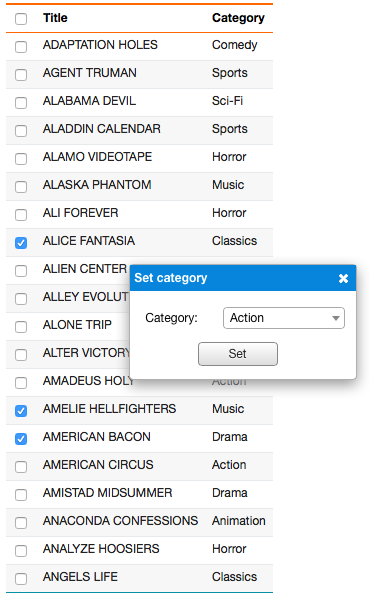
The processing procedure (sp_DBR_film_category_set) receives the IDs as a comma-separated string. To update the UI after the operation, you can use dbr.refresh to reload the report or use the selected.set_col_value JavaScript helper to update the visible values directly.
select 'dbr.javascript', concat("selected.set_col_value('films', '", in_ids, "', 'category', '", v_category_name, "')");
Specialized Editing Types
Rich Text Editing
myDBR integrates with TinyMCE for rich text support. Enable the Rich Text extension and set the type to richtext. Use the html: 1 option if the column contains rendered HTML that should be converted to editable content.
select 'dbr.editable', 'rich_text', 'sp_DBR_edit_rich_text', 'in_id=id', 'type=richtext', "options={'html':1, 'richtext':{'width': 600, 'height': 350}}";
Code Editing
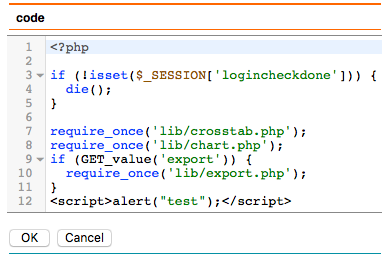
The Code Editor extension provides syntax highlighting for HTML, PHP, JavaScript, CSS, and SQL.
select 'dbr.editable', 'code', 'sp_DBR_edit_code', 'inA=id', 'type=php';
File Uploads
The dbr.upload command adds file upload functionality to your reports. The handling procedure receives the target path, filename, and file size as its first three parameters.
select 'dbr.upload.options', 'accepted_files', 'jpg,png';
select 'dbr.upload', '/var/www/upload', 'sp_DBR_upload_file', v_client_id;
