Passing HTML Into the Page
Commands
dbr.html - Passes HTML directly into the report. Use this for safe HTML (your own HTML)
dbr.html.ext - Passes HTML directly into the report. HTML content is filtered for unsafe code. Use this for unsafe HTML
dbr.purehtml - Same as dbr.html, kept for compatibility
dbr.html: - Includes HTML in a string. Use this for safe HTML (your own HTML)
dbr.html.ext: - Includes HTML in a string. HTML content is filtered for unsafe code. Use this for unsafe HTML
dbr.purehtml: - Same as dbr.html:, kept for compatibility
dbr.javascript - Includes JavaScript code in the report
dbr.css - Includes CSS definitions in the report
dbr.head - Includes tags in the HTML head section
dbr.file - Includes an HTML file in the report
dbr.redirect - Performs a server-side 302 redirect to another page. Uses the same syntax as dbr.report
dbr.http.get - Makes an HTTP GET request and optionally returns the result
dbr.http.delete - Makes an HTTP DELETE request and optionally returns the result
dbr.http.post - Makes an HTTP POST request and returns the result
dbr.http.put - Makes an HTTP PUT request and returns the result
dbr.http.save - Calls a procedure to handle an HTTP POST/GET result
dbr.http.option - Passes options to dbr.http.post
dbr.http.header - Saves HTTP headers
dbr.http.debug - Debugs an HTTP PUT/POST call
dbr.system - Executes a system call
Syntax
select 'dbr.html', 'HTML statement'
select 'dbr.html.ext', 'HTML statement'
select 'dbr.purehtml', 'HTML statement'
select 'dbr.html:HTML statement'
select 'dbr.html.ext:HTML statement'
select 'dbr.purehtml:HTML statement'
select 'dbr.javascript', 'javascript code' [, 'onload']
select 'dbr.css', 'css'
select 'dbr.head', html_tags
select 'dbr.file', path_to_file
select 'dbr.redirect', URL | report [, param1,[ ,param2]]]
select 'dbr.http.get', URL [,params..[, 'silent']]
select 'dbr.http.delete', URL [,params..[, 'silent']]
select 'dbr.http.post', URL [,params..[, 'silent']]
select 'dbr.http.put', URL [,params..[, 'silent']]
select 'dbr.http.save', 'procedure_name', [,params..]
select 'dbr.http.option', option, value1 [, value2]
select 'dbr.http.header', 'procedure_name', id
select 'dbr.http.debug', 1
select 'dbr.system', command
Explanation
The 'dbr.http.option' can be:
- 'curl', cURL_option, value
- Passes cURL options todbr.http.post - 'accept', comma_separated_http_code
- Lists codes that are accepted HTTP values in addition to the default 200, 400, 409, 422
By default, myDBR escapes HTML tags included in the report. However, with specific commands, myDBR allows the browser to render selected HTML code directly.
Using the dbr.html command enables the client's browser to render HTML. This command passes the entire result set directly to the browser. With the dbr.html: syntax, HTML can be mixed within the query, allowing for HTML formatting inside the cells of the result table.
Additionally, you can include JavaScript code using dbr.javascript. This command is a shorthand version of dbr.html and wraps the parameter with script tags. An optional onload parameter executes the script after the DOM tree has loaded. Similarly, you can add custom CSS with dbr.css.
Example - 'dbr.html'
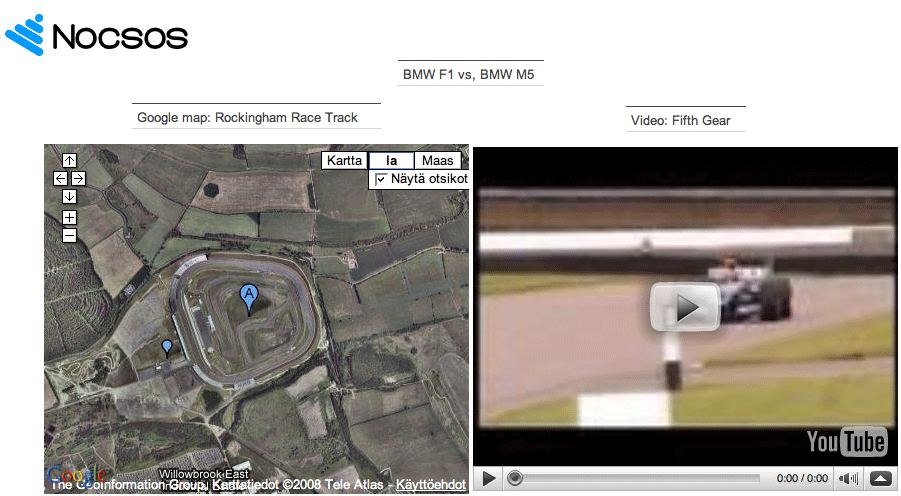
To place a logo in the top left corner of the report and embed a Google Maps map and YouTube video side by side, use the following approach:
- For the logo, use the
dbr.htmlcommand to insert an HTML image tag (<img>) with the logo's URL. - Embed Google Maps using the
dbr.htmlcommand and inserting the Google Maps embed code. - Embed a YouTube video next to it using the
dbr.htmlcommand and inserting the YouTube embed code.
select 'dbr.title', ''; /* We do not need the title */
/* Putting up the logo. We'll use a predefined left div */
select 'dbr.html', '<div class="left"><img src="https://mydbr.com/images/apppic.png"></div>';

/* Use this as title */
select 'dbr.hideheader';
select 'BMW F1 vs, BMW M5';

/* Put map and video side by side. 1st column */
select 'dbr.html', '<table align="center"><tr><td>';

select 'dbr.hideheader';
select 'Google map: Rockingham Race Track';

/* We have the Google Map URL here */
select 'dbr.html', RockinghamURL
from mydb.Racetracks;

/* 2nd column */
select 'dbr.html', '</td><td>';

select 'dbr.hideheader';
select 'Video: Fifth Gear';

/* We have the YouTube video URL here */
select 'dbr.html', F1vsM5URL
from mydb.Videos;

/* Close the table */
select 'dbr.html', '</td></tr></table>';
The report will position the logo on the top left. The map and video will appear side-by-side:
Example - 'dbr.html:'
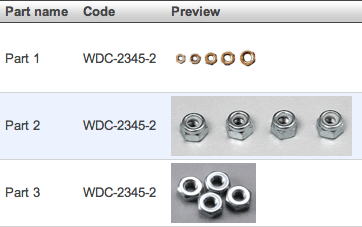
The report outputs a list of parts and their images:
select 'Part 1' as 'Part name',
       'WDC-2345-1' as 'Code',
       'dbr.html:<img src="http://www.mysite.com/parts/WDC-2345-1.jpg">' as 'Preview'
union
select 'Part 2',
       'WDC-2345-2',
       'dbr.html:<img src="http://www.mysite.com/parts/WDC-2345-2.jpg">'
union
select 'Part 3',
       'WDC-2345-3',
       'dbr.html:<img src="http://www.mysite.com/parts/WDC-2345-3.jpg">';
The report outputs a normal myDBR report list. myDBR places the indicated image in the third column's cell.
Example - 'dbr.head'
You can include your own tags in the HTML HEAD section with dbr.head:
select 'dbr.head', '<meta property="og:url" content="http://mydomain.com/index.htm">';
select 'dbr.head', '<meta name="twitter:card" content="summary_large_image">';
select 'dbr.head', '<meta name="twitter:card" content="summary_small_image">';
'dbr.redirect' with the OEM License
The OEM license allows you to use 'dbr.redirect' to redirect a page to another page with a server-side 302 redirect. The syntax is the same as for 'dbr.report'. The command expects a single line as a result set. Redirects are particularly useful when implementing forms with the Post/Redirect/Get (PRG) pattern. This pattern ensures that after handling a POST request, the server redirects to another page to prevent form resubmission on refresh.
select 'dbr.redirect', 'sp_DBR_landing_page', 'inInt=par', 'append=&hdr=0'

select 12345 as 'par';
'dbr.head' with the OEM License
The OEM license allows you to set a dynamic title element:
select 'dbr.head', concat('<title'>', thetitle, '</title'>');
Example - 'dbr.head'
You can include your own tags in the HTML HEAD section with dbr.head:
select 'dbr.head', '<meta property="og:url" content="http://mydomain.com/index.htm">';
select 'dbr.head', '<meta name="twitter:card" content="summary_large_image">';
select 'dbr.head', '<meta name="twitter:card" content="summary_small_image">';

Example - 'dbr.http.get' and 'dbr.http.post'
Commands allow you to make HTTP POST and HTTP GET calls, optionally returning results. The result can be saved to the database, shown directly in the report, passed into a template, or passed into a linked report as a parameter.
Parameters named user and pass will be used as username and password for HTTP authentication.
An HTTP POST call that shows the data returned from the call:
select 'dbr.http.post', 'https://financial_system/entry.php?action=cost', 'Purchase' as 'title', 200 as 'amount';
This is a silent HTTP POST call where no data is shown after the call. It can be followed by a redirect. This approach is useful, for example, in form handling scenarios.
select 'dbr.http.post', 'https://financial_system/entry.php?action=cost',  'Purchase' as 'title', 200 as 'amount', 'silent';
select 'dbr.redirect', 'sp_DBR_entry_finished';
An HTTP GET call where returned data is stored in the record variable. It can then be displayed or handled in the template code:
select 'dbr.title', '';
select 'dbr.record', 'begin', 'get';
select 'dbr.http.post', 'https://financial_system/entry.php',  1234 as 'businessline';

select 'dbr.record', 'end';
select 'dbr.template', '#get';

select 1 as 'dummy';
Passing cURL options to the HTTP POST with dbr.http.option:
select 'dbr.http.option', 'curl', 'CURLOPT_HTTPHEADER', 'Accept: application/json';
select 'dbr.http.option', 'curl', 'CURLOPT_HTTPHEADER', 'Authorization: Bearer {token}';
select 'dbr.http.option', 'curl', 'CURLOPT_HTTPHEADER', 'Content-Type: application/json';

select 'dbr.http.post', 'https://financial_system/entry.php',
  'sample@email.com' as 'email',
  123 as 'id';
An HTTP POST/GET result passed as a parameter to a linked report:
When the dbr.http.post or dbr.http.get is preceded by dbr.report, the result of the HTTP call (usually JSON) is passed to the report parameter marked as a special columnReference: get_data, post_data, or put_data. All parameters used in the dbr.report command (such as id and date) will be removed from the GET/POST. They are used exclusively for the dbr.report. If the result of the HTTP call exceeds what the server can handle (usually 8K, depending on your server setup), you can use dbr.http.save to save the HTTP call result to the database before calling the linked report.
When a linked report is used with dbr.http.post, dbr.http.put or dbr.http.get, myDBR performs a redirect to that report. Ensure there is no output before this to avoid the 'Cannot modify header information' error.
  select 'dbr.report', 'sp_DBR_post_json', 'inID=id', 'in_date=date','inJSON=post_data';
 select 'dbr.http.post', 'https://financial_system/entry.php',  1234 as 'businessline', 'abc' as 'sdata', current_date() as 'date', v_ID as 'id';
myDBR first performs an HTTP POST with data businessline=1234&sdata=abc and retrieves the result. It then calls the stored procedure sp_DBR_post_json with parameters id, date, and the JSON data obtained from the POST request.
The result of an HTTP POST/GET request is saved before calling the linked report:
To handle large results from an HTTP POST/GET call, you can save the result to the database. The linked report is called after the save operation completes. The saving procedure is not a myDBR report but a helper procedure where parameters can be passed. The result from the HTTP POST/GET call is added as the last parameter.
The saving procedure may return a single row, typically an ID for the saved data. In this case, the returned value will be passed to the linked report. For example, if the saving procedure returns the last inserted ID as id, this id is then passed as a parameter to sp_DBR_post_json.
The example also includes saving the HTTP headers for the POST call. Note that the headers are saved after the main report is executed, so they are available in the report defined by dbr.report, not in the main report.
CREATE PROCEDURE `sp_save_json`(inLogin varchar(30), in_whatever varchar(5), inJSON JSON)
begin

insert into json_data (username, additional_data, json_data)
values (inLogin, in_whatever, inJSON);

select last_insert_id() as 'id';
end

create procedure sp_post_header (
in_id int,
in_line int,
in_header varchar(255)
)
begin

if (in_line=1) then
  delete
  from http_post_headers
  where id=in_id;
end if;

insert into http_post_headers (id, line, header)
values (in_id, in_line, in_header);

end

 select 'dbr.http.save', 'sp_save_json', inLogin, 'whatever';
 select 'dbr.http.header', 'sp_post_header ', 1;
 select 'dbr.report', 'sp_DBR_post_json', 'inID=id', 'in_date=date';
 select 'dbr.http.post', 'https://financial_system/entry.php',  1234 as 'businessline', 'abc' as 'sdata', current_date() as 'date';
myDBR first performs an HTTP POST with data businessline=1234&sdata=abc and retrieves the result. The headers are passed to sp_post_header. Subsequently, it calls sp_save_json with parameters inLogin, 'whatever', and the JSON data obtained from the POST. Finally, the linked report is invoked. Since sp_save_json returns a column with the same name as the parameter reference for the linked report (inID=id), this returned value is passed to the linked report.