Calendar
The calendar feature allows you to create a fully featured calendar from your data. myDBR uses FullCalendar to render it. Calendar data can be fetched dynamically via AJAX or loaded directly within the main report.
Commands
dbr.calendar - Creates a calendar from a result set or dynamically via Ajax
dbr.calendar.report - Defines the Ajax report for calendar data
dbr.calendar.options - Sets calendar options
Syntax
select 'dbr.calendar', [max_width [, default_date]]
select 'dbr.calendar.report', 'sp_DBR_calendar_ajax' [, param1[, param2..]]
select 'dbr.calendar.options', option, value
Syntax Tips
'event.style', 'css style'- default CSS style for event (set in the main report).'editable', editing_type , 'sp_DBR_editing_report', 'ColumnRef'[, 'ColumnRef'...]- Sets entries editable; possible editing types:'all/""'|'start'|'duration'(set in the calendar data report when data is fetched via Ajax)'new', 'new_buttons_class', number_of_datetime_parameters- Connects a day click to the "New calendar entry" button (set in the main report)'ical', 1- Allows the user to download the event's iCal file'selectable', 1- Allows users to create calendar events by clicking on dates or painting the days/hours. Connected to the "New calendar entry" button (set in the main report).'event.editable', ColumnRef- Overrides theediting_type. Possible values from the column:'all','start','duration', and''. With'all', both start and duration can be edited; with'', no editing is allowed (set in the calendar data report when data is fetched via Ajax)'event.id', ColumnRef- Define events IDs column. Can be used with FullCalendar JavaScript API (set in calendar data report when data is fetched via Ajax)'event.description', ColumnRef- Defines the event description column. This is an additional field that will be included in the iCal file when available.'event.location', ColumnRef- Defines the event location column. This is an additional field that will be included in the iCal file when available.'event.url', ColumnRef- Defines the event URL column. This is an additional field that will be included in the iCal file when available.'description.hide', 1- Controls whether the calendar shows the description. By default it does.'location.hide', 0- Controls whether the calendar shows the location. By default it does not.'url.hide', 0- Controls whether the calendar shows the URL. By default it does not.'tooltip', ColumnRef- Show data on tooltip'height', pixels- (FullCalendar) height of the Calendar in pixels (set in the main report).'weekends', 1 | 0- (FullCalendar) show / hide weekends (set in the main report).'weekNumbers', 1 | 0- (FullCalendar) show / hide weeknumbers (set in the main report).'firstDay', 0-7- (FullCalendar) Start of the week (the default is determined by the locale) (set in the main report).'defaultView', viewname- (FullCalendar) one of the available views. Defaults: month, week, day and listWeek'slotDuration', duration- (FullCalendar) The time steps in the calendar. Default "00:30:00" (30 minutes)'eventDisplay', 'block' | 'auto' | 'list-item' | 'background' | 'inverse-background' | 'none'- (FullCalendar) Controls which preset rendering style events use. myDBR defaults to 'block'.
Data Set Returned to the Calendar
The following columns are used by the calendar:
| Column | Data from | Shown by default in the calendar |
|---|---|---|
datetime_from | First column | Yes |
datetime_to | Second column | Yes |
Entry | Third column | Yes |
Description | event.description | Yes |
Location | event.location | No (use location.hide, 0 to show it) |
URL | event.url | No (use url.hide, 0 to show it) |
The calendar data report must include, at a minimum, the start date, end date, and the entry text. An optional description field is also included by default and is used for iCal data export.
The location and URL columns are available but hidden in the calendar by default. They can be displayed using the location.hide and url.hide options.
Additional columns can be used for styling, linked reports, entry URLs, returning IDs, and more. When the ical option is enabled, users can download the iCal file for the entries. The iCal file can include additional fields such as location and description, configured using the corresponding options.
Entries are treated as full-day entries (no times shown in the calendar) if both start and end datetimes have a time component of 00:00:00, or if the start is 00:00:00 and the end is null.
Data Fetched Dynamically via Ajax
Fetching data dynamically via Ajax allows browsing an unlimited date range. Content is fetched as needed when the user navigates the calendar. The implementation consists of a main report that initializes the calendar and a data report that retrieves the entries. The data report is specified using the dbr.calendar.report command.
Calendar-level options and commands are specified in the main report. These include settings such as height, weekends, weekNumbers, and others.
create procedure sp_DBR_calendar( in_calendar_id int)
begin

select 'dbr.calendar', 800;
-- Define the calendar data report
select 'dbr.calendar.report', 'sp_DBR_calendar_data', in_calendar_id;

-- Show the calendar with result set, content does not matter
select 'dummy';

end;
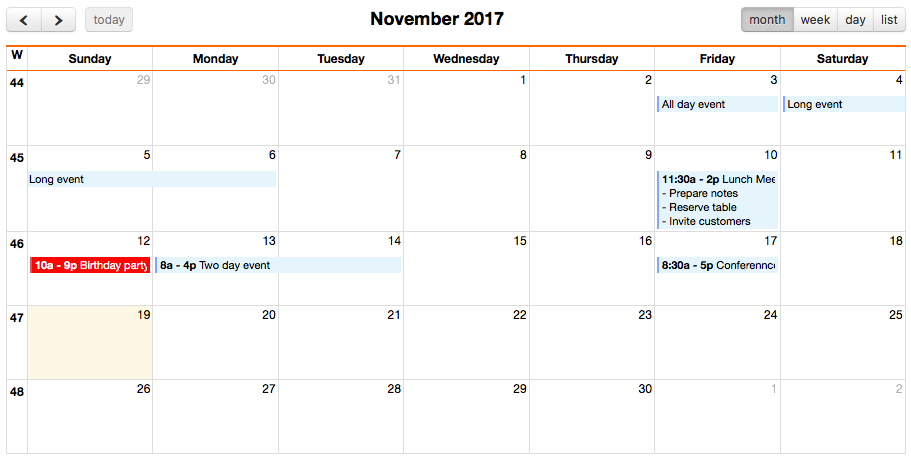
dbr.cellstyle and dbr.cellclass can be used to style individual entries. For example, the "Birthday party" entry can be styled with background:red;color:white.
All commands and options that reference the result set's columns or are specific to calendar entries (such as dbr.report, dbr.url, the editable option, and the event.editable option) must be placed in the dynamic data report, not in the main report.
To enable downloading of the iCal file for an entry, use the ical option. When using iCal, additional fields such as location and description can be passed to the iCal file.
create procedure sp_DBR_calendar_data(
in_from date,
in_to date,
in_calendar_id int )
begin

select 'dbr.cellstyle', 'entry', 'style';
select 'dbr.report', 'sp_DBR_entry_actions', '[entry]', 'in_id=id', "popup";

-- Optional iCal-file option with optional description and location fields
select 'dbr.calendar.options', 'ical', 1;
select 'dbr.calendar.options', 'event.description', 'description';
select 'dbr.calendar.options', 'event.location', 'location';

-- Select all entries which are inside the current range. Optional criteria (like in_calendar_id) can be used.
-- datetime_from, datetime_to, entry are the mandatory columns, rest are additional
select datetime_from, datetime_to, entry, style, id, description, location
from mydb.calendar
where calendar_id=in_calendar_id and
  cast(datetime_from as date) <= in_to and ifnull(cast(datetime_to as date),in_from) >= in_from;

end
Data Fetched Directly
If you have a limited date range and a small number of entries, you can create a calendar using a single report without dynamic data fetching.
create procedure sp_DBR_calendar( in_calendar_id int)
begin

select 'dbr.calendar', 800;

-- Override the header set in defaults.php to remove the prev/next month buttons
select 'dbr.calendar.options', 'header', '{"left": "today","center":"title","right":"month,agendaWeek,agendaDay,listMonth"}';

select datetime_from, datetime_to, entry, style
from mydb.calendar
where calendar_id=in_calendar_id and
  cast(datetime_from as date) <= in_to and ifnull(cast(datetime_to as date),in_from) >= in_from;

end
Editable Events
Using the editable option, you can enable editing of calendar events. By default, users can adjust the start time by dragging events and change the duration by resizing them. You can further control this by setting the editing_type parameter to 'all' (both start and duration), '' (both), 'start' (start time only), or 'duration' (duration only). Individual entry editing capabilities can be specified per entry using the event.editable option.

Adjusting calendar event duration:

Adjusting calendar event start time:
To add or delete events on the calendar, use a linked report.
When using the calendar editing report, starttime and endtime are automatically added as the last parameters. Additional parameters can be defined in the editable option after the editing report name.
create procedure sp_DBR_calendar( in_calendar_id int)
begin

select 'dbr.calendar', 800;

select 'dbr.calendar.options', 'editable', '', 'sp_DBR_calendar_edit', 'id';

select 'dbr.calendar.report', 'sp_DBR_calendar_editable_data', in_calendar_id;
-- Show the calendar with result set, content does not matter
select 'dummy';

end
In the data report, you can customize the default editable settings for each entry using the 'event.editable' option. The referenced column can contain:
-
An empty string ('') to indicate no editing,
-
'start' to allow editing of the start time,
-
'duration' to edit the event duration, or
-
'all' to enable both start time and duration editing.
create procedure sp_DBR_calendar_editable_data(in_from date, in_to date, in_choose int) begin
-- All options that refer to columns need to be placed into the data report
select 'dbr.cellstyle', 'entry', 'style';
select 'dbr.calendar.options', 'editable', '', 'sp_DBR_calendar_edit', 'id', 'datetime_from', 'datetime_to';

-- Set editing capability per event
select 'dbr.calendar.options', 'event.editable', 'editable';

-- Optionally set the id which can be used with the FullCalendar JavaScript API
select 'dbr.calendar.options', 'event.id', 'id';

-- Add capability to delete an event (misc[] is a dynamically ([]-notation) created embedded elemennt where the result from the report is put)
select 'dbr.report', 'sp_DBR_calendar_event_delete','[entry]', 'misc[]', 'in_id=id', '"dbr.html:<span style="color:red">Delete event</span>"';

-- Update a calendar entry text
select 'dbr.report', 'sp_DBR_calendar_event_update','[entry]', 'misc[]', 'in_id=id', 'in_entry<=entry';

select datetime_from, datetime_to, entry, style, editable, id
from mydb.calendar
where calendar_id=in_calendar_id and
  cast(datetime_from as date) <= in_to and ifnull(cast(datetime_to as date),in_from) >= in_from;

end
The sp_DBR_calendar_edit report would then have three parameters: id, start time, and end time.
create procedure sp_DBR_calendar_edit(
in_id int,
in_from datetime,
in_to datetime
)
begin

update mydb.calendar
set
  datetime_from = in_from,
  datetime_to = in_to
where id=in_id;

end
You can also reject edits within the editing routine and optionally return custom text to the user. If the returned text begins with reject:, the UI undoes the edit and reverts the event to its original position. Otherwise, the text is displayed to the user and the UI accepts the changes.
create procedure sp_DBR_calendar_edit(
in_id int,
in_from datetime,
in_to datetime
)
begin

declare v_min_time datetime;

select min_time into v_min_time
from mydb.open_slots;

if (in_from < v_min_time) then
  select 'reject:The selected timeslot is closed';
else
  update mydb.calendar
  set
    datetime_from = in_from,
    datetime_to = in_to
  where id=in_id
  end if;
  select 'Event succesfully moved';
end if;

end
Add new Events to Calendar
To add new events to the calendar, use a linked report. Add a button to the main report and link it to a dynamic div (such as misc in this example).
select 'dbr.button', 'New';

select 'dbr.report', 'sp_DBR_calendar_event_new', 'misc[]';
select 'Dummy';
The linked report sp_DBR_calendar_event_new accepts datetime and entry text parameters. After inserting the entry, it refreshes the Ajax calendar.
create procedure sp_DBR_calendar_event_new(
in_from datetime,
in_to datetime,
in_entry varchar(255)
)
begin

insert into mydb.calendar ( datetime_from, datetime_to, entry )
values ( in_from, in_to, in_entry );

select 'dbr.javascript', "$('.mycal').fullCalendar( 'refetchEvents' )";

end
Remove an Event from the Calendar
create procedure sp_DBR_calendar_event_delete(
in_id int
)
begin

delete
from mydb.calendar
where id=in_id;

select 'dbr.javascript', "$('.mycal').fullCalendar( 'refetchEvents' )";

end
Update an Event Text in Calendar
create procedure sp_DBR_calendar_event_update(
in_id int,
in_entry varchar(255)
)
begin

update mydb.calendar
set entry=in_entry
where id=in_id;

select 'dbr.javascript', "$('.mycal').fullCalendar( 'refetchEvents' )";

end
FullCalendar Functionality with the "New Calendar Entry" Button
Adding a "New Calendar Entry" button to the report enables automatic association with internal calendar actions, including:
- Double-clicking on the calendar to create a new entry
- Clicking and dragging on the calendar to create a new entry
Create the main report and configure calendar data to be fetched dynamically:
create procedure sp_DBR_calendar( in_calendar_id int)
begin

select 'dbr.javascript','
function confirmdel(obj) {
    return confirm("Are you sure you want to delete the entry?");
}';

select 'dbr.calendar', 800;
-- Define the calendar data report
select 'dbr.calendar.report', 'sp_DBR_calendar_data', in_calendar_id;

-- Bind to 'newentry' button and tell that the new calendar entry report has two datetime parameters
select 'dbr.calendar.options', 'new', 'newentry', 2;
-- Allow user to create new calendar entries by painting (click and drag with mouse)
select 'dbr.calendar.options', 'selectable', 1;

-- Show the calendar with result set, content does not matter
select 'dummy';

-- Create the "New calendar entry"-button with newentry-class (and add plus-character to the button)
select 'dbr.button', '<i class="fa fa-plus" aria-hidden="true"></i> New calendar entry', 'newentry button';
select 'dbr.report', 'sp_DBR_calendar_event_new', 'misc[]';
select 1;

end;

create procedure sp_DBR_calendar_data(in_from date, in_to date, in_id)
begin

select 'dbr.cellstyle', 'entry', 'style';
select 'dbr.calendar.options', 'editable', '', 'sp_DBR_calendar_edit', 'id', 'datetime_from', 'datetime_to';
select 'dbr.calendar.options', 'event.editable', 'editable';

select 'dbr.report', 'sp_DBR_calendar_delete','[entry]', 'in_id=id', "misc[]", 'callbefore=confirmdel', '"dbr.html:<span style="color:red">Delete event</span>"';

select 'dbr.calendar.options', 'event.id', 'id';

select datetime_from, datetime_to, entry, style, editable, id
from mydb.calendar
where calendar_id=in_id
  cast(datetime_from as date) <= in_to and cast(datetime_to as date) >= in_from;
Download all Events in a View to an iCal File
To allow users to download all events in the current view as an iCal file, use the following:
select 'dbr.html', '<button onclick="Calendar.iCalAll();">Download Calendar Events</button>';
If your report features multiple calendars, assign a result class to each calendar and pass the class name as a parameter to Calendar.iCalAll(). This ensures myDBR identifies the specific calendar for the download operation.
Calendar Look and Feel
The default style for the calendar adopts myDBR's own style. To revert to the FullCalendar native style, add a result class such as fullcalendar to the result set. This can also be set permanently in the configuration: $mydbr_defaults['calendar']['default_class'] = 'fullcalendar'.
The default rendering style for calendar entries is block. FullCalendar offers an alternative dot style, which can be enabled with: select 'dbr.calendar.options', 'eventDisplay', 'auto';.