Running total
Commands
dbr.running_total - Calculates the running total for a column
Syntax
select 'dbr.running_total', ColumnRef [, SourceColumnRef ]
Explanation
A running total is the cumulative sum of a specified column that increments or decrements row by row.
The command offers two options: when only one parameter is provided, the running total is computed over the specified column. If a second parameter is provided, the first parameter's column accumulates the running total based on values from the second column. Running totals can be used in both tabular reports and charts.
Examples
Using Running Total in a Tabular Report
A 'Running total' column calculates its values based on the column itself, while 'Running total 2' derives its values from the 'Revenue' column.
select 'dbr.running_total', 'Running total';

select 'dbr.running_total', 'Running total 2', 'Revenue';

select
  revenue_month as 'Month',
  revenue as 'Revenue',
  revenue as 'Running total',
  null as 'Running total 2'
from mydb.data;

Using a Running Total in a Chart
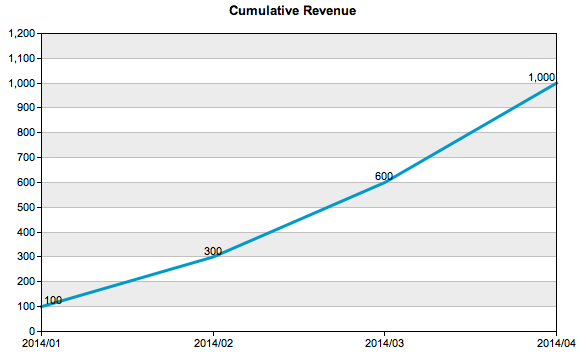
A cumulative revenue chart:
select 'dbr.chart', 'line', 'Cumulative Revenue';
select 'dbr.running_total', 'Revenue';

select
  revenue_month as 'Month',
  revenue as 'Revenue'
from mydb.data;