Aggregate Functions
Commands
dbr.sum - Calculates the sum of the selected column
dbr.min - Calculates the minimum value of the selected column
dbr.max - Calculates the maximum value of the selected column
dbr.count - Calculates the number of non-null values
dbr.countr - Counts the total number of rows
dbr.countd - Calculates the distinct number of non-null values
dbr.avg - Calculates the average of the selected column
dbr.sum.prefix - Sets the prefix to be used with dbr.sum
dbr.min.prefix - Sets the prefix to be used with dbr.min
dbr.max.prefix - Sets the prefix to be used with dbr.max
dbr.count.prefix - Sets the prefix to be used with dbr.count
dbr.countd.prefix - Sets the prefix to be used with dbr.countd
dbr.avg.prefix - Sets the prefix to be used with dbr.avg
dbr.summary.text - Adds text to summary row
dbr.calc - Allows you to create calculation formulas to populate cells
dbr.summary.calc - Same as dbr.calc. Kept for compatibility with older versions
dbr.summary.options - Change the default aggregate calculation
Syntax
select 'dbr.sum', ColumnReference [, ColumnReference ...]
select 'dbr.min', ColumnReference [, ColumnReference ...]
select 'dbr.max', ColumnReference [, ColumnReference ...]
select 'dbr.count', ColumnReference [, ColumnReference ...]
select 'dbr.countr', ColumnReference [, ColumnReference ...]
select 'dbr.count', ColumnReference [, ColumnReference ...]
select 'dbr.avg', ColumnReference [, ColumnReference ...]
select 'dbr.sum.prefix', ColumnReference, 'prefix'
select 'dbr.min.prefix', ColumnReference, 'prefix'
select 'dbr.max.prefix', ColumnReference, 'prefix'
select 'dbr.count.prefix', ColumnReference, 'prefix'
select 'dbr.countd.prefix', ColumnReference, 'prefix'
select 'dbr.avg.prefix', ColumnReference, 'prefix'
select 'dbr.summary.text', ColumnReference, TextOrColumnReference[, forsubrows ]
select 'dbr.calc', ColumnReference|ColumnReference.aggregate, Formula[, summary_format[, level, 'force' | 'force_summary']]
select 'dbr.summary.calc', ColumnReference, Formula
select 'dbr.summary.options', 'option' [, value]
Syntax Tips
Where:
-
ColumnReference
See Column Reference for syntax. -
TextWithColumnReference
Plain text or text with a reference to a column. Example: "Active users [active_summary_column]" -
Formula
Any PHP-compatible calculation that can include column references ([colref]). Example: "([col1]+[col1])/100" -
ColumnReference.aggregate
An aggregate function applied to a column. Vertical aggregates are calculated over rows:colref.sumCalculates the sum of a column's values. For example 'Totals.sum'colref.minCalculates the minimum of a column's values.colref.maxCalculates the maximum of a column's values.colref.avgCalculates the average of a column's values.colref.countCalculates a count of the rows.
-
summary_format
A format string to format dbr.calc on summary rows (for example "%.0f cases") -
level
Limits the summary levels or rows to which dbr.calc is applied: "0"=level 0 only, "1"=level 1 only, "<2"=rows, level 0 and 1 -
force | force_summary
By default, dbr.calc performs the calculation only on cells with no value. By using the 'force' or 'force_summary' option, the calculations are performed on all rows or summary rows only, respectively.
Explanation
With aggregate functions, you can calculate the sum, minimum, maximum value, and count of individual rows for a column in the result set. If the result set includes header levels, the calculation is also performed for each break level.
dbr.summary.options include:
- limit_summary_level, level - Calculate summaries only to a certain level (0=just total, 1=levels 0..1, 2=levels 0..2, or '=1' for only header level 1 skipping 0)
- skip_single_line_summary - Do not include summary lines if the summary level has only one row
Example Use of an Aggregate Function
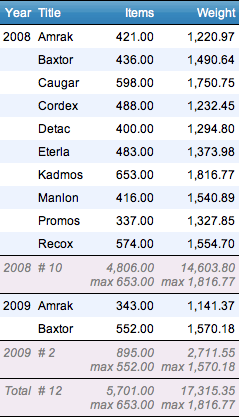
We'll calculate a summary for Items and the Weight column and also the maximum for Weight
select 'dbr.sum', 'Items', 'Weight'; /* Calculate sum from Items and Weight column */
select 'dbr.max', 'Weight';    /* Calculate sum from Items and Weight column */
select 'dbr.count', 'Title';

select Title, sum(Items), sum(Weight) as 'Weight'
from mydb.Exampledata
group by Title;
This will produce the following result:

Including Header Levels in the Calculation
If a header level is included, the subtotals are also calculated:
select 'dbr.hdr', 'Year';    /* Sets the Year to be a header column */
select 'dbr.sum', 'Items', 'Weight'; /* Calculate sum from Items and Weight column */
select 'dbr.max', 'Weight';    /* Calculate sum from Items and Weight column */
select 'dbr.count', 'Title';  /* How many rows do we have? */
select 'dbr.summary.text', 'Year', 'Total';

select Year, Title, Items, Weight
from mydb.Exampledata
order by Year, Title;
Subtotals are calculated and the text appears in the summary row:
Calculations
The dbr.calc command allows the insertion of formulas for a column. References to other columns are made using the Column reference. You can freely add any complex formula using PHP syntax.
In addition to column references, you can reference aggregate values (horizontal and vertical) using the syntax [column.sum] for vertical aggregate values and [column.hsum] for horizontal aggregate values (crosstab values). This syntax is supported for all aggregate types (sum, min, max, count, avg).
When performing calculations, the formula is applied to all non-null columns.
Basic Calculation
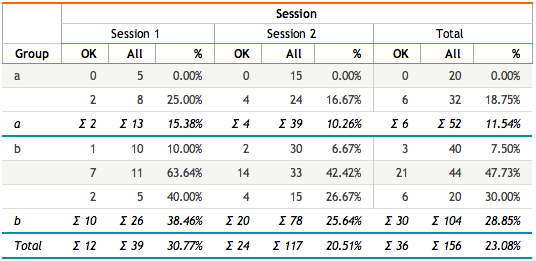
In the example, if we want to calculate the percentage based on two columns, we reserve a place for the calculation by including a null value in the query and assigning it a column reference (e.g., "percent").
select 'dbr.sum', 'ok', 'all';

select 'dbr.calc', 'percent', '[ok]/[all]*100';

select Group,
       OK[ok],
       allresults as 'All[all]',
       null as '%[percent]'
from group_sessions;

Calculation Applied to a Crosstable
When a calculation formula is applied to the crosstable data value, it is performed for each dataset.
select 'dbr.sum', 'ok', 'all';
select 'dbr.hsum', 'ok', 'all';
select 'dbr.hdr', 'group';
select 'dbr.crosstab', 'session';
select 'dbr.colstyle', 'percent', '%.2f %';
select 'dbr.summary.text', 'group', 'Total';
select 'dbr.calc', 'percent', '[ok]/[all]*100';

select Group[group],
       Session[session],
       OK[ok],
       allresults as 'All[all]',
       null as '%[percent]'
from group_sessions;
Calculation with an Aggregate Column Reference
An aggregate column reference can refer to the aggregate value for the column. A common use case is calculating the percentage share of each row relative to the total value.
The [Items.sum] reference in the formula refers to the total sum of the Items column.
select 'dbr.subtitle', 'Vertical summary';

select 'dbr.calc', 'percent', '[Items]/[Items.sum]*100';
select 'dbr.colstyle', 'percent', '%.0f %';
select 'dbr.sum', 'Items';

select   Name,
  sum(Items) as 'Items',
  null as '%[percent]'
from mydata
group by Name;

Calculation with a Horizontal Aggregate Column Reference
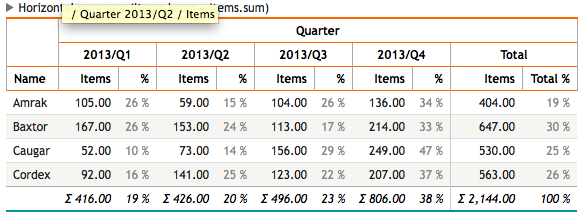
A horizontal aggregate column reference performs calculations over the data columns in a crosstable. In this example, we'll calculate the share for each quarter of the total year for each row.
The [Items] refers to each Items column (one per quarter). The [Items.hsum] refers to the total column and is independent of the actual Total column generated by the dbr.hsum command. The dbr.hnull command generates a placeholder null column for the percent column.
select 'dbr.subtitle', 'Horizontal summary (Items.hsum)';
select 'dbr.crosstab', 'quarter';
select 'dbr.calc', 'percent', '[Items]/[Items.hsum]*100';
select 'dbr.hnull', 'percent';
select 'dbr.colstyle', 'percent', '[color:#888]%.0f %';
select 'dbr.sum', 'Items';
select 'dbr.hsum', 'Items';

select
  Name,
  f_quarter(thedate) as 'Quarter[quarter]',
  sum(Items) as 'Items',
  null as '%[percent]'
from mydata
group by Name, 2;
Combining Calculation with a Horizontal and Vertical Aggregate Column Reference
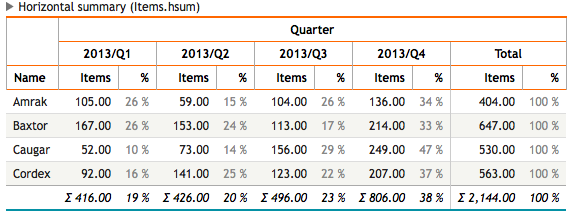
The following example combines both calculation methods. The result differs from the earlier example in that the total percent column will show the percentage of each row's total value from the grand total.
To achieve this, we'll use the dbr.hnull command to create a placeholder for the row total.
select 'dbr.subtitle', 'Horizontal summary (Items.hsum + Items.sum)';
select 'dbr.crosstab', 'quarter';

/* Calculate percent for data columns */
select 'dbr.calc', 'data_percent', '[Items]/[Items.hsum]*100';

/* Create a placeholder null-column for the total_percent */
select 'dbr.hnull', 'total_percent';

/* Calculate the total_percent */
select 'dbr.calc', 'total_percent', '[Items]/[Items.sum]*100';

/* We do not need to show the row percentage for each data column, only in total column */
select 'dbr.hidecolumn.data', 'total_percent';

/* Fade the percent columns a bit to make table more readable */
select 'dbr.colstyle', 'data_percent', '[color:#888]%.0f %';
select 'dbr.colstyle', 'total_percent', '[color:#888]%.0f %';
select 'dbr.sum', 'Items';
select 'dbr.hsum', 'Items';

select   Name,
  f_quarter(thedate) as 'Quarter[quarter]',
  sum(Items) as 'Items',
  null as '%[data_percent]',
  null as 'Total %[total_percent]'
from mydata
group by Name, 2;